Exit
  • Global community
    • Language:
      • Deutsch
      • English
      • Español
      • Français
      • Português
  • 日本語コミュニティ
  • 한국 커뮤니티
0

august 2021 update, cant open photoshop files

New Here ,
Aug 02, 2021 Aug 02, 2021

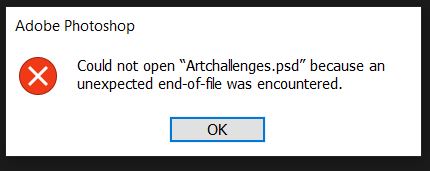
after the latest update i have been unable to open any of my photoshop files, whether they are on the cloud or saved on my computer. The same error messages pop up for every file I try to open. Am I the only one with this issue or is there a fix for this?


TOPICS
Windows
749
Translate
Report
Community guidelines
Be kind and respectful, give credit to the original source of content, and search for duplicates before posting. Learn more
community guidelines
Adobe
Community Expert ,
Aug 02, 2021 Aug 02, 2021

If this happens with every file, it appears there must be a corruption in you Photoshop installation. Each time we update, we bring along any previous corruptions with us, and the update may exacerbate the issues. 
I recommend using the Photoshop Cleaner Tool (https://helpx.adobe.com/creative-cloud/kb/cc-cleaner-tool-installation-problems.html) to completly uninstall Photoshop, then restart your computer, and reinstall Photoshop from your CC account - fresh installation. 
Please save any presets, workspaces, brushes, etc. before doing this.


Adobe Community Expert / Adobe Certified Instructor

Translate
Report
Community guidelines
Be kind and respectful, give credit to the original source of content, and search for duplicates before posting. Learn more
community guidelines
New Here ,
Aug 09, 2021 Aug 09, 2021

this doesnt appear to be working, ive tried this method twice and the same error message appears when I try to open any of my files. 

Translate
Report
Community guidelines
Be kind and respectful, give credit to the original source of content, and search for duplicates before posting. Learn more
community guidelines
LEGEND ,
Aug 09, 2021 Aug 09, 2021
LATEST

Looks like file corruption from here.

Translate
Report
Community guidelines
Be kind and respectful, give credit to the original source of content, and search for duplicates before posting. Learn more
community guidelines