


- Home
- Photoshop ecosystem
- Discussions
- Re: Is there any way to prevent UI updating while ...
- Re: Is there any way to prevent UI updating while ...

Copy link to clipboard
Copied
Seems when we updating some contents of number of layers. It seems, photoshop consume lot of performance for updating preview in canvas.
Is there any way to stop updating while running the script?
Can we show updated preview result at the end of the script execution?


 1 Correct answer


This is an old thread, but came up with another question. To speed up my scripts to avoid redraws, I use code to turn on and off action steps:
//function to set action playback to step by step so the screen refreshes when a dialog box comes up
function setActionToStep(){
	var idsetd = charIDToTypeID( "setd" );
		var desc1 = new ActionDescriptor();
		var idnull = charIDToTypeID( "null" );
			var ref1 = new ActionReference();
			var idPrpr = charIDToTypeID( "Prpr" );
			var idPbkO = charIDToTy

Explore related tutorials & articles
 14
Replies
14
14
Replies
14


Copy link to clipboard
Copied
I turn most of it off by toggling the Palette at the beginning and end of the script. The image update seems to be a low priority when it come to Photoshop Updating all the visible palettes slows down the script
app.togglePalettes();

Copy link to clipboard
Copied
In addition to turning off panels, perhaps zooming in to 12800% then returning to 100% or fit on screen?

Copy link to clipboard
Copied
Why that percent of zooming?
Copy link to clipboard
Copied
To limit what is redrawn, if that is a possible slowdown factor (which is why my response was worded as a question, I’m just guessing and don’t know if it is a factor or not).
Copy link to clipboard
Copied
Other tip: zooming out before making selection by using Quick Selection Tool can accelerate making selection quite much.

Copy link to clipboard
Copied
With the panels turned off, the speed can be increased if the document is placed in a floating window with a minimum zoom and window size.
You can check.
$.hiresTimer;
for (var i = 0; i < 500; i++)
app.activeDocument.artLayers.add();
var d = new ActionDescriptor();
var r = new ActionReference();
r.putIndex(stringIDToTypeID("snapshotClass"), 1);
d.putReference(stringIDToTypeID("null"), r);
executeAction(stringIDToTypeID("select"), d, DialogModes.NO);
alert("Done in " + ($.hiresTimer/1000000).toFixed(2) + " seconds", "Timer");
Copy link to clipboard
Copied
That would seem correct to me. I have tried to find a way to Automate minimizing a floating window so there would be nothing that Photoshop would need to refresh. However theres is no interface except Photoshop UI window frame controls to do that. There is no shortcut or menu item to minimize a window.

Copy link to clipboard
Copied
Can anyone tell me how can I controll photoshop after run my script... For example I want a pannel window which have 2 button and on those button there is a function like to save image or blur or any filter I want individual...so when I run script it is not allowing photoshop to open document or other operation on photoshop... So is there any way to working in photoshop during script running
Copy link to clipboard
Copied
As mentioned in your other topic, this would require and extension panel, not a script.
Copy link to clipboard
Copied
so is there any way to creat a panel for photoshop cs5 version. i tried uxp developer tool but it dosen't support blow cc2020 version
Copy link to clipboard
Copied
This is an old thread, but came up with another question. To speed up my scripts to avoid redraws, I use code to turn on and off action steps:
//function to set action playback to step by step so the screen refreshes when a dialog box comes up
function setActionToStep(){
	var idsetd = charIDToTypeID( "setd" );
		var desc1 = new ActionDescriptor();
		var idnull = charIDToTypeID( "null" );
			var ref1 = new ActionReference();
			var idPrpr = charIDToTypeID( "Prpr" );
			var idPbkO = charIDToTypeID( "PbkO" );
			ref1.putProperty( idPrpr, idPbkO );
			var idcapp = charIDToTypeID( "capp" );
			var idOrdn = charIDToTypeID( "Ordn" );
			var idTrgt = charIDToTypeID( "Trgt" );
			ref1.putEnumerated( idcapp, idOrdn, idTrgt );
		desc1.putReference( idnull, ref1 );
		var idT = charIDToTypeID( "T   " );
			var desc2 = new ActionDescriptor();
			var idperformance = stringIDToTypeID( "performance" );
			var idperformance = stringIDToTypeID( "performance" );
			var idstepByStep = stringIDToTypeID( "stepByStep" );
			desc2.putEnumerated( idperformance, idperformance, idstepByStep );
		var idPbkO = charIDToTypeID( "PbkO" );
		desc1.putObject( idT, idPbkO, desc2 );
	executeAction( idsetd, desc1, DialogModes.NO );
}//end function

// function to return action to accelerated mode - no refresh of screen for each step.=======================================================
function setActionToAcc(){
	var idsetd = charIDToTypeID( "setd" );
		var desc3 = new ActionDescriptor();
		var idnull = charIDToTypeID( "null" );
			var ref2 = new ActionReference();
			var idPrpr = charIDToTypeID( "Prpr" );
			var idPbkO = charIDToTypeID( "PbkO" );
			ref2.putProperty( idPrpr, idPbkO );
			var idcapp = charIDToTypeID( "capp" );
			var idOrdn = charIDToTypeID( "Ordn" );
			var idTrgt = charIDToTypeID( "Trgt" );
			ref2.putEnumerated( idcapp, idOrdn, idTrgt );
		desc3.putReference( idnull, ref2 );
		var idT = charIDToTypeID( "T   " );
			var desc4 = new ActionDescriptor();
			var idperformance = stringIDToTypeID( "performance" );
			var idperformance = stringIDToTypeID( "performance" );
			var idaccelerated = stringIDToTypeID( "accelerated" );
			desc4.putEnumerated( idperformance, idperformance, idaccelerated );
		var idPbkO = charIDToTypeID( "PbkO" );
		desc3.putObject( idT, idPbkO, desc4 );
	executeAction( idsetd, desc3, DialogModes.NO );
}//end function

Copy link to clipboard
Copied
Thanks a lot this is working for update windows and not all the UI and composition of the PSD. Is very fast.

Copy link to clipboard
Copied
Thanx for the script. The "Acc"-mode is speeding up some actions nicely. I noticed though that for some reason the "Step"-mode seams to make actions even slower than they used to be. Is that possible? What parameter(s) is the step-mode actually setting? Can i control that manually? Any info on this is very much appreciated.
Copy link to clipboard
Copied
Thanx for the script. The "Acc"-mode is speeding up some actions nicely. I noticed though that for some reason the "Step"-mode seams to make actions even slower than they used to be. Is that possible? What parameter(s) is the step-mode actually setting? Can i control that manually? Any info on this is very much appreciated.
By @k11715897

The script is referencing the following action playback options:
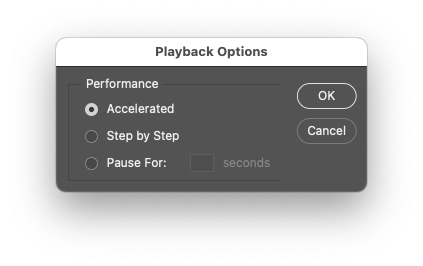
As you can see from the GUI screenshot, "accelerated" and "stepByStep" have no params.


Find more inspiration, events, and resources on the new Adobe Community
Explore Now
 AdChoices