Exit
  • Global community
    • Language:
      • Deutsch
      • English
      • Español
      • Français
      • Português
  • 日本語コミュニティ
  • 한국 커뮤니티
0

Load into Stack not working after the latest update

Community Beginner ,
Oct 28, 2021 Oct 28, 2021

After updating to the lates photoshop

>File >Scripts >Load files into Stacks

do nothing.   It's as if the option does not excist?

Please help, I use this function very often.


TOPICS
Actions and scripting
322
Translate
Report
Community guidelines
Be kind and respectful, give credit to the original source of content, and search for duplicates before posting. Learn more
community guidelines

correct answers 2 Correct answers

Community Beginner , Nov 10, 2021 Nov 10, 2021

Thank you JJMack.  I contacted the help station and they reset something.

I'm still not sure what. Now its working. 

Thanks


Translate
Community Beginner , Nov 10, 2021 Nov 10, 2021

Thank you Bojan Zivkovic.  I contacted the help station and they reset something.

I'm still not sure what. Now its working. 

Thanks

Translate
Adobe
Community Expert ,
Oct 28, 2021 Oct 28, 2021

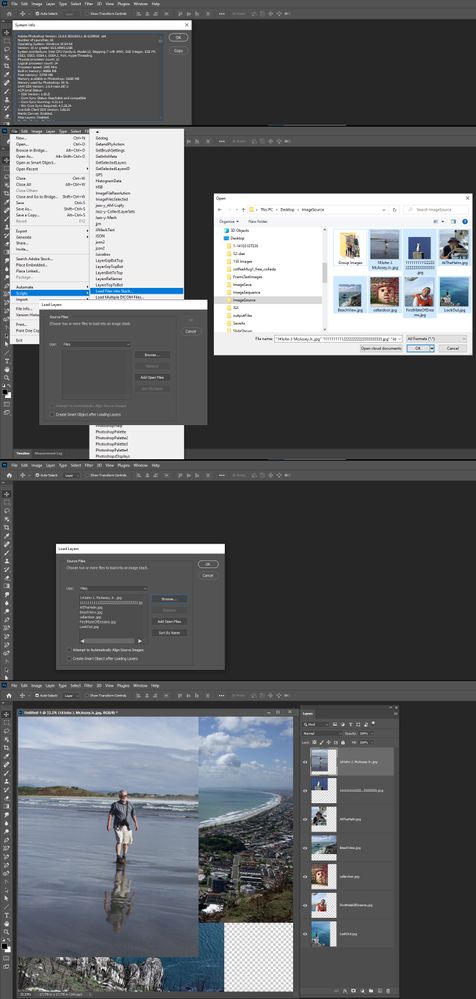
What OS version are you using on your Mac or PC ? I do noe see a problem on mte Windows 10 PC.

Capture.jpg

JJMack
Translate
Report
Community guidelines
Be kind and respectful, give credit to the original source of content, and search for duplicates before posting. Learn more
community guidelines
Community Beginner ,
Nov 10, 2021 Nov 10, 2021

Thank you JJMack.  I contacted the help station and they reset something.

I'm still not sure what. Now its working. 

Thanks


Translate
Report
Community guidelines
Be kind and respectful, give credit to the original source of content, and search for duplicates before posting. Learn more
community guidelines
Community Expert ,
Oct 28, 2021 Oct 28, 2021

It seems there are some problems with that function. Try with preference reset or Install previous versions of your Creative Cloud apps

Translate
Report
Community guidelines
Be kind and respectful, give credit to the original source of content, and search for duplicates before posting. Learn more
community guidelines
Community Beginner ,
Nov 10, 2021 Nov 10, 2021
LATEST

Thank you Bojan Zivkovic.  I contacted the help station and they reset something.

I'm still not sure what. Now its working. 

Thanks

Translate
Report
Community guidelines
Be kind and respectful, give credit to the original source of content, and search for duplicates before posting. Learn more
community guidelines