Copy link to clipboard
Copied
I am gonna cry. I have lost ALL my brushes. Brushes that i have made for myself. All GONE. wtf Adobe?? no one asked for your basic ass brushes. how does it magically and automatically DELETE brushes from my computer WITHOUT my permission!??
Copy link to clipboard
Copied
Hi Nandhi,
Did you save your brushes from the panel menu? If so, you can load them in again.
Were your Photoshop preferences reset recently? If so, anything that was not saved, such as brushes, actions, gradients, etc., will be gone. If they were saved, they can be loaded back in.
~ Jane
Copy link to clipboard
Copied
If they were reset, i did not initiate it. My app wasnt even updated - i was still using 2018 version. They were literally there on day and gone the next. My brushes used to be appended after the legacy brushes, not as separate groups. They were saved once before but even that saved .abr file is missing or replaced by the new brushes by Photoshop.
How can photoshop magically decide to wipe my preferences? How can my brush files be wiped from my Presets folder on my computer WITHOUT my permission? Ridiculous.
Copy link to clipboard
Copied
Hi
Brushes are stored in a preference file.
See this thread: Re: Where are my brushes stored ???
The .abr files are used to load and export brushes.
Jane
Copy link to clipboard
Copied
See if the answer here helps: losing my brushes
Copy link to clipboard
Copied
Nandhi wrote
I am gonna cry. I have lost ALL my brushes. Brushes that i have made for myself. All GONE. wtf Adobe?? no one asked for your basic *** brushes. how does it magically and automatically DELETE brushes from my computer WITHOUT my permission!??
More background please?
Did this happen after updating?
Are these brushes you have recently made?
Were they in a group, or are ALL of your brush groups gone?
Have you had previous versions of Photoshop on the same system?
The next bit depends on what operating system you are using?
But for Windows
C:\Users\[your user name]\AppData\Roaming\Adobe

You can see that Photoshop left some CC2018 files when it installed CC2019
Hmmm... OK, I was expecting to find the Presets folder in CC2018 but there wasn't one. I might have forgot to hold down Ctrl when moving the Brushes folder to CC2019. Have a look and see if that helps.

It's OK to delete ALL of your open brush groups from the right click menu

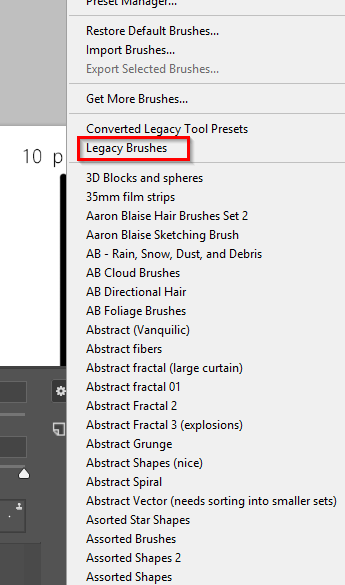
They'll be waiting for you via the little cog icon top right corner
The Legacy folder has all the presets we used to have before CC2017

Copy link to clipboard
Copied
every time photoshop updates I loose everything, F*%k photoshop!
Copy link to clipboard
Copied
me to!
Copy link to clipboard
Copied
Can you check my post a wee way up the thread. It tells you where to find your brushes.
Actually, I have just realised that I only provided file locations for Windows. You'll find Mac locations here if you need them.
Find more inspiration, events, and resources on the new Adobe Community
Explore Now