
Known Participant
July 31, 2019
Question

Need help with weird shadow [3D]

  • July 31, 2019
  • 2 replies
  • 689 views

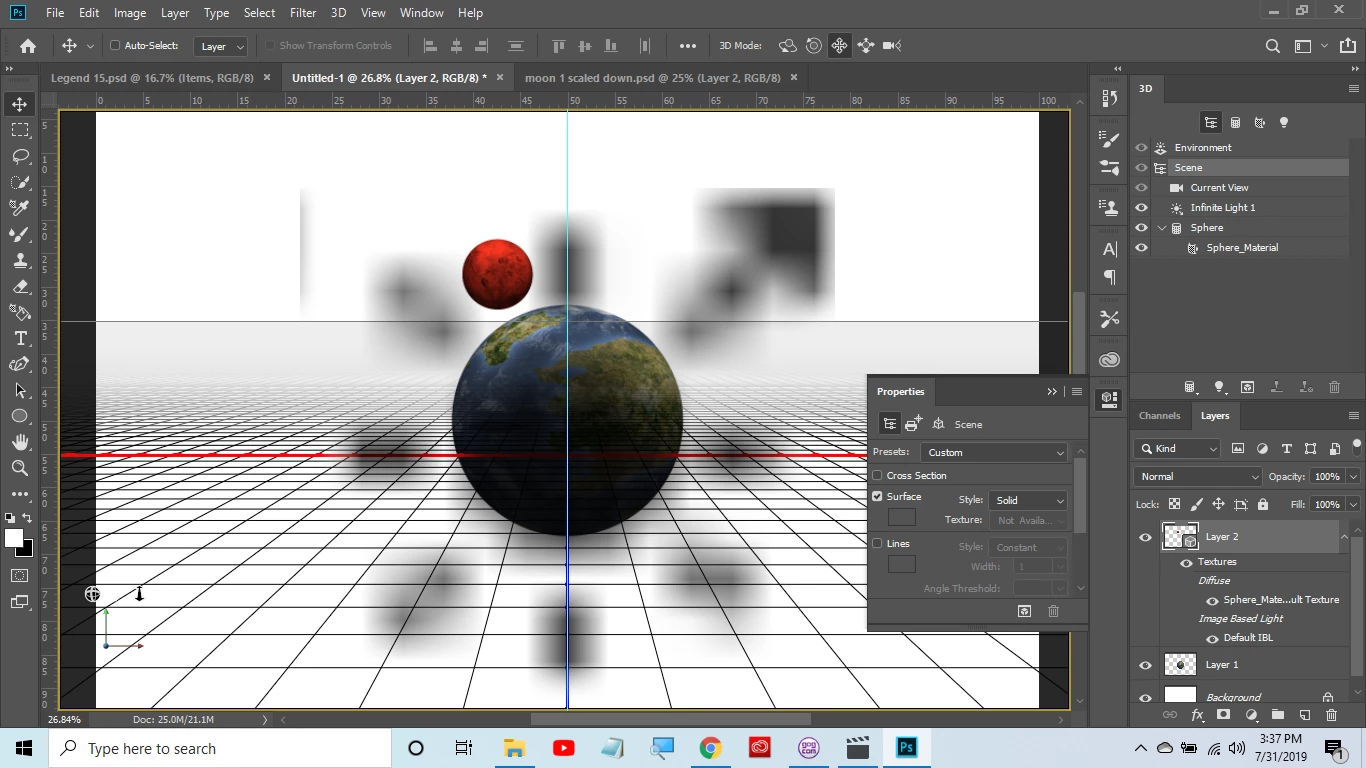
Hello.  I am new to photoshop and having a huge problem.  When I open a file I have saved with a 3d object their is this shadow mess on it.  It is the same for any saved 3d image I open.  The shadow is only there when the layer is selected.  If I click off of the layer onto another layer that is not 3d it disappears.  I have tried clicking off each eye icon in the 3d layer, for example texture, but it does not go away.  I have been trying to solve this for days.  Thanks for any help.  Gary
This topic has been closed for replies.

2 replies

Mylenium
Legend
August 1, 2019

That merely means your shadow map resolution is actually pretty terrible which could be down to inadequate graphics hardware to begin with, botched/ flaky drivers and/ or the relevant settings in PS not being lined up to make the best of your hardware resources. check the preferences, update your drivers, verify the 3D panel render settings.

Mylenium

garrobalAuthor
Known Participant
August 1, 2019

hello and thanks for the reply. I am very new. My drivers, however are up

to date and that shadow is there even when I deselct cast and catch

shadow. It also does not occur when originally making the image only when

reopening a saved file. One other thing that is strange is that you only

see it when the layer is selected. Thanks

On Thu, Aug 1, 2019 at 2:53 AM c.pfaffenbichler <forums_noreply@adobe.com>

c.pfaffenbichler
Community Expert
Community Expert
August 1, 2019

Have you tried different Advanced-settings for the GPU?

garrobalAuthor
Known Participant
August 1, 2019

hello. I am new and do not know what advanced settings to try. thanks for

the reply. I am very new. My drivers, however are up to date and that

shadow is there even when I deselct cast and catch shadow. It also does

not occur when originally making the image only when reopening a saved

file. One other thing that is strange is that you only see it when the

layer is selected. Thanks

On Thu, Aug 1, 2019 at 2:48 AM c.pfaffenbichler <forums_noreply@adobe.com>