
Copy link to clipboard
Copied
Hi,
I'm trying to automate a process and batch handle a bunch of files. When I get to the saving, however, it pops up with a prompt and won't continue to the next files without user input confirming the save options. Is there anyway to surpress this popup?
I've tried using app.displayDialogs = DialogModes.NO but this just stops the dialog but doesnt actually save the file or continue onto the other files. It doesnt give me a popup if I dont change/set any of the PDFSaveOptions but then the PDF output isnt correct (it comes out squashed vertically).
#target photoshop
// PDF Options;
var sfwOptions = new PDFSaveOptions();
sfwOptions.PDFCompatibility = PDFCompatibility.PDF14;
sfwOptions.embedThumbnail = true;
sfwOptions.preserveEditing = true;
sfwOptions.presetFile = "[High Quality Print]";
function saveFile(fileName) {
var theNewName =splits[0] + fileName;
// Save PNG
var saveFile = new File( outputFolder + '/' + theNewName + '.pdf' );
//activeDocument.exportDocument( saveFile, ExportType.SAVEFORWEB, sfwOptions );
activeDocument.saveAs(saveFile,sfwOptions);
// Undo changes (go back to previous state)
myDocument.activeHistoryState = savedState;
}
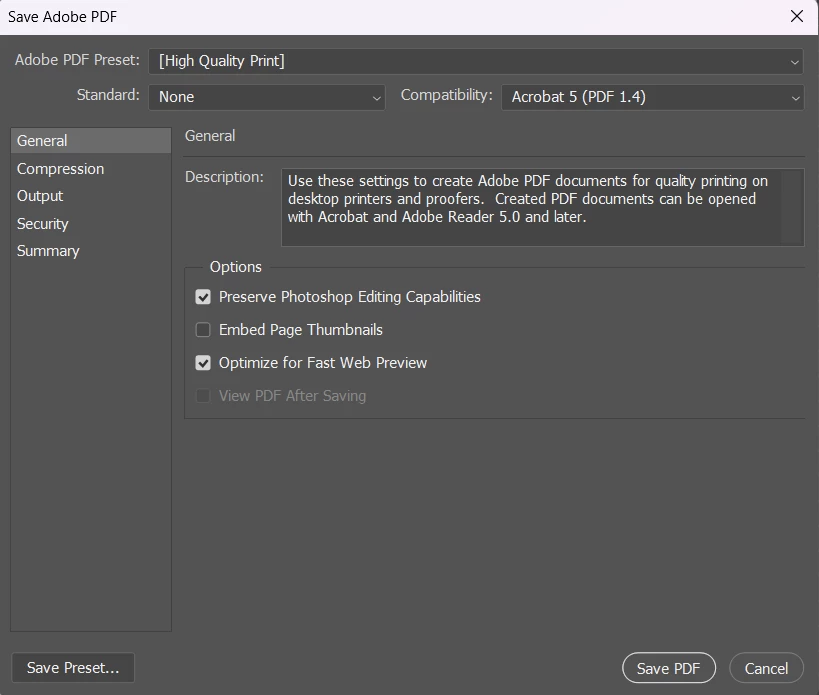
This DOM code doesn't trigger a dialog:
var saveFile = File("~/Desktop/" + activeDocument.name.replace(/\.[^\.]+$/, ''));
SavePDF(File(saveFile + ".pdf"));
function SavePDF(saveFile) {
pdfSaveOptions = new PDFSaveOptions();
pdfSaveOptions.PDFCompatibility = PDFCompatibility.PDF14;
pdfSaveOptions.embedThumbnail = true;
pdfSaveOptions.preserveEditing = true;
activeDocument.saveAs(saveFile, pdfSaveOptions, true, Extension.LOWERCASE);
}
But this line does:
pdfSave...
Copy link to clipboard
Copied
This DOM code doesn't trigger a dialog:
var saveFile = File("~/Desktop/" + activeDocument.name.replace(/\.[^\.]+$/, ''));
SavePDF(File(saveFile + ".pdf"));
function SavePDF(saveFile) {
pdfSaveOptions = new PDFSaveOptions();
pdfSaveOptions.PDFCompatibility = PDFCompatibility.PDF14;
pdfSaveOptions.embedThumbnail = true;
pdfSaveOptions.preserveEditing = true;
activeDocument.saveAs(saveFile, pdfSaveOptions, true, Extension.LOWERCASE);
}
But this line does:
pdfSaveOptions.presetFile = "[High Quality Print]";
Another option is to use AM code recorded by the ScriptingListener plugin:
Copy link to clipboard
Copied
Thanks that worked!
In my post I mentioned it being exported wrong without the settings but ive realised that seems to be an issue with it opening the pdf. its stretching it vertically for some reason any idea why this might be?
If i open it manually the file is 1994px in height however the script opened it at a height of 2621px
var fileRef = new File( input+'/'+filename );
var doc_a = app.open( fileRef );
Copy link to clipboard
Copied
What version of Photoshop is rasterizing the PDF?
Is the longest pixel edge > 32,000px?
Copy link to clipboard
Copied
Photoshop version 24.7
and no, the sizes of the files im using are
3742x1994
3860x2419
2726x1994
3521x2621
But then it seems to stretch them all to 3521x2621
Copy link to clipboard
Copied
Fixed it using the open options I saw in a different post of yours. Thanks.
var pdfOpenOpts = new PDFOpenOptions();
pdfOpenOpts.antiAlias = true;
pdfOpenOpts.bitsPerChannel = BitsPerChannelType.EIGHT;
// MEDIABOX | CROPBOX | BLEEDBOX | TRIMBOX | ARTBOX
pdfOpenOpts.cropPage = CropToType.MEDIABOX;
pdfOpenOpts.mode = OpenDocumentMode.RGB;
pdfOpenOpts.resolution = 300;
pdfOpenOpts.suppressWarnings = true;
pdfOpenOpts.usePageNumber = true;
Copy link to clipboard
Copied
It seems to be taking the canvas size from the last file it uses (it also is the one with the highest height) and then stretching all other files vertically and horizontally to fit that canvas size as it opens them, but it hasnt used that file at all when it opens the first file so i dont know why it would use its dimensions instead of the current files?
Get ready! An upgraded Adobe Community experience is coming in January.
Learn more