
Answered
Script UI text field input
The Photoshop script UI has a checkbox group, radio button group, and text field group. The script remembers the last used settings for the checkbox and radio buttons. But does not remember the last used text filed string.
I have a general idea of what needs to happen for the script to remember the text field input but don’t know how to implement it.
The text field string needs to be converted to a numerical value to save it as UI parameter. Then reconverted to a string for the script to display it in the text field input.
Can someone look at the script to help me find out why the string value is not retained when the script runs?
Thnak you
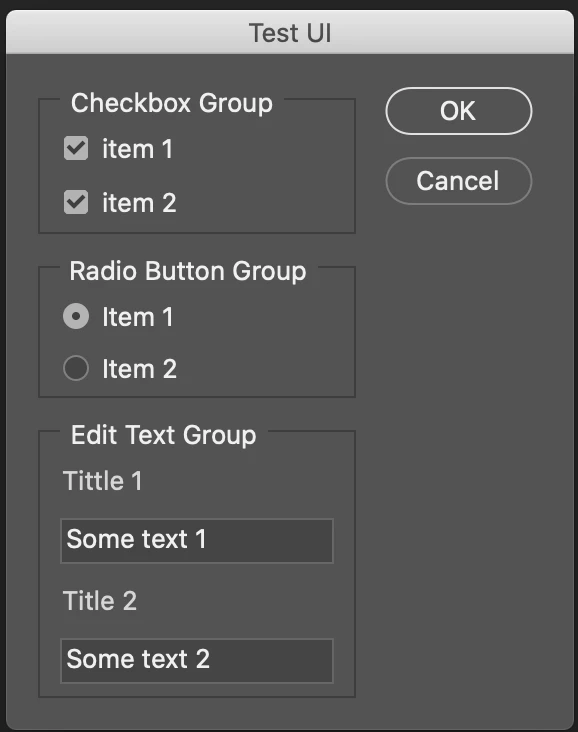
#target photoshop;
app.bringToFront();

cTID = function(s) { return cTID[s] || (cTID[s] = app.charIDToTypeID(s)); };
sTID = function(s) { return app.stringIDToTypeID(s); };


function showDialog() {

  // DIALOG
  // ======
  var dialog = new Window("dialog");
      dialog.text = "Test UI";
      dialog.orientation = "row";
      dialog.alignChildren = ["left","top"];
      dialog.spacing = 10;
      dialog.margins = 16;

  // GROUP1
  // ======
  var group1 = dialog.add("group", undefined, {name: "group1"});
      group1.preferredSize.width = 150;
      group1.orientation = "column";
      group1.alignChildren = ["fill","top"];
      group1.spacing = 10;
      group1.margins = 0;
      group1.alignment = ["left","fill"];

  // PANEL1
  // ======
  var panel1 = group1.add("panel", undefined, undefined, {name: "panel1"});
      panel1.text = "Checkbox Group";
      panel1.orientation = "column";
      panel1.alignChildren = ["left","top"];
      panel1.spacing = 10;
      panel1.margins = 10;
      panel1.alignment = ["fill","top"];

      dialog.checkbox1 = panel1.add("checkbox", undefined, undefined, {name: "checkbox1"});
      dialog.checkbox1.text = "item 1";
      dialog.checkbox1.alignment = ["fill","top"];
      dialog.checkbox1.value = checkbox1;

      dialog.checkbox2 = panel1.add("checkbox", undefined, undefined, {name: "checkbox2"});
      dialog.checkbox2.text = "item 2";
      dialog.checkbox2.alignment = ["fill","top"];
      dialog.checkbox2.value = checkbox2;

  // PANEL2
  // ======
  var panel2 = group1.add("panel", undefined, undefined, {name: "panel2"});
      panel2.text = "Radio Button Group";
      panel2.orientation = "column";
      panel2.alignChildren = ["left","top"];
      panel2.spacing = 10;
      panel2.margins = 10;
      panel2.alignment = ["fill","top"];

      dialog.radiobutton1 = panel2.add("radiobutton", undefined, undefined, {name: "radiobutton1"});
      dialog.radiobutton1.text = "Item 1";
      dialog.radiobutton1.alignment = ["fill","top"];
      dialog.radiobutton1.value = radiobutton1;

      dialog.radiobutton2 = panel2.add("radiobutton", undefined, undefined, {name: "radiobutton2"});
      dialog.radiobutton2.text = "Item 2";
      dialog.radiobutton2.alignment = ["fill","top"];
      dialog.radiobutton2.value = radiobutton2;

  // PANEL3
  // ======
  var panel3 = group1.add("panel", undefined, undefined, {name: "panel3"});
      panel3.text = "Edit Text Group";
      panel3.orientation = "column";
      panel3.alignChildren = ["left","top"];
      panel3.spacing = 10;
      panel3.margins = 10;
      panel3.alignment = ["fill","top"];

      dialog.statictext1 = panel3.add("statictext", undefined, undefined, {name: "statictext1"});
      dialog.statictext1.text = "Tittle 1";
      dialog.statictext1.alignment = ["fill","top"];

      dialog.edittext1 = panel3.add('edittext {properties: {name: "edittext1"}}');
      dialog.edittext1.text = "Some text 1 ";
      dialog.edittext1.alignment = ["fill","top"];
      dialog.edittext1.value = edittext1;

      dialog.statictext2 = panel3.add("statictext", undefined, undefined, {name: "statictext2"});
      dialog.statictext2.text = "Title 2";
      dialog.statictext2.alignment = ["fill","top"];

      dialog.edittext2 = panel3.add('edittext {properties: {name: "edittext2"}}');
      dialog.edittext2.text = "Some text 2";
      dialog.edittext2.alignment = ["fill","top"];
      dialog.edittext2.value = edittext2;


// GROUP2
// ======
var group2 = dialog.add("group", undefined, {name: "group2"});
    group2.orientation = "column";
    group2.alignChildren = ["fill","top"];
    group2.spacing = 10;
    group2.margins = 0;

var ok = group2.add("button", undefined, undefined, {name: "ok"});
    ok.text = "OK";

var cancel = group2.add("button", undefined, undefined, {name: "cancel"});
    cancel.text = "Cancel";

      //update the params and save them off on close
      function updateParams() {
        checkbox1 = dialog.checkbox1.value;
        checkbox2 = dialog.checkbox2.value;
        radiobutton1 = dialog.radiobutton1.value;
        radiobutton2 = dialog.radiobutton2.value;
        edittext1 = dialog.edittext1.text;
        edittext2 = dialog.edittext2.text;
    };


    ok.onClick = function () {
      updateParams();
      saveSettings();
      dialog.close(1);
    };

    dialog.center();
    return dialog.show();

}

  // Settings
  var checkbox1 = false;
  var checkbox2 = false;
  var radiobutton1 = false;
  var radiobutton2 = false;
  var edittext1
  var edittext2

  //IDs for custom option saving / loading
  const settingsID = "exportOptions";

  const checkbox1ID = stringIDToTypeID("checkbox1");
  const checkbox2ID = stringIDToTypeID("checkbox2");
  const radiobutton1ID = stringIDToTypeID("radiobutton1");
  const radiobutton2ID = stringIDToTypeID("radiobutton2");
  const edittext1ID = stringIDToTypeID("edittext1");
  const edittext2ID = stringIDToTypeID("edittext2");

  var exportSettings;

  try {
    exportSettings = app.getCustomOptions(settingsID);
  } catch (e) {
    saveSettings();
  }

  if(typeof exportSettings == "undefined") {
    saveSettings();
  }

  function loadSettings() {
    exportSettings = app.getCustomOptions(settingsID);

    if(exportSettings.hasKey (checkbox1ID))
    checkbox1 = exportSettings.getBoolean (checkbox1ID);

    if(exportSettings.hasKey (checkbox2ID))
    checkbox2 = exportSettings.getBoolean (checkbox2ID);

    if(exportSettings.hasKey (radiobutton1ID))
    radiobutton1 = exportSettings.getBoolean (radiobutton1ID);

    if(exportSettings.hasKey (radiobutton2ID))
    radiobutton2 = exportSettings.getBoolean (radiobutton2ID);

    if(exportSettings.hasKey (edittext1ID))
    edittext1 = exportSettings.getString (edittext1ID);

    if(exportSettings.hasKey (edittext2ID))
    edittext1 = exportSettings.getString (edittext2ID);

  }

  function saveSettings() {
    //save defaults
    var newExportSettings = new ActionDescriptor();

    newExportSettings.putBoolean (checkbox1ID, checkbox1);
    newExportSettings.putBoolean (checkbox2ID, checkbox2);
    newExportSettings.putBoolean (radiobutton1ID, radiobutton1);
    newExportSettings.putBoolean (radiobutton2ID, radiobutton2);
    newExportSettings.putString (edittext1ID, edittext1);
    newExportSettings.putString (edittext2ID, edittext2);

    app.putCustomOptions(settingsID,newExportSettings,true);
  }


main()

function main(){

  try {

    //UI parameters
    loadSettings();
    var result = showDialog();

      if(result != 2) {

        if(checkbox1){
          alert('The checkbox 1 value is '+checkbox1);
        }
        if(checkbox2) {
          alert('The checkbox 2 value is '+checkbox2);
        }
        if(radiobutton1) {
          alert('The radio button 1 value is '+radiobutton1);
        }
        if(radiobutton2) {
          alert('The radio button 2 value is '+radiobutton2);
        }
        if(edittext1) {
          alert('The edit text 1 value is '+edittext1);
        }
        if(edittext2) {
          alert('The edit text 2 value is '+edittext2);
        }

      }

    }
    catch (e) {
      alert(e + ' ' + e.line);
    }

}


 AdChoices