Exit
  • Global community
    • Language:
      • Deutsch
      • English
      • Español
      • Français
      • Português
  • 日本語コミュニティ
  • 한국 커뮤니티
0

Text effect

New Here ,
Feb 24, 2024 Feb 24, 2024

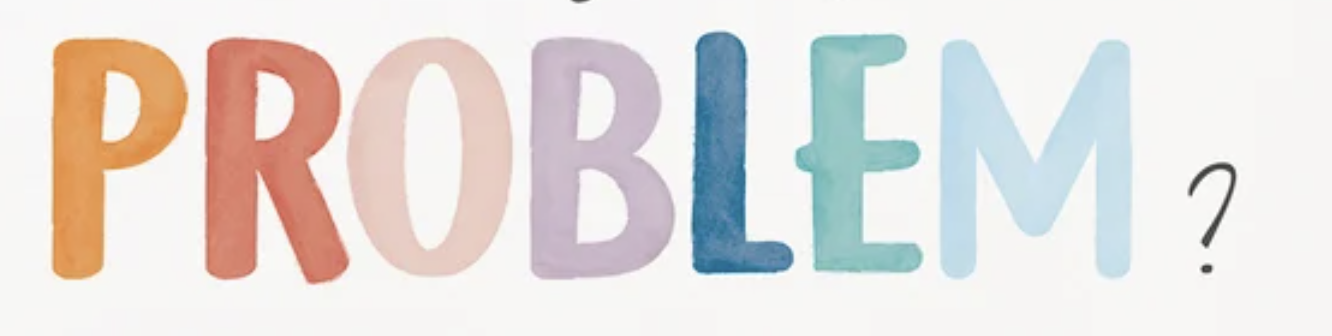
Does anybody know how to create this watercolor-like text effect in Photoshop? 

TOPICS
macOS
205
Translate
Report
Community guidelines
Be kind and respectful, give credit to the original source of content, and search for duplicates before posting. Learn more
community guidelines
Adobe
Community Expert ,
Feb 25, 2024 Feb 25, 2024

I would recommend using a stock image of a watercolored background (or generative fill), clipping mask that to a Filtered Smart Object (edit: Displace with an appropriate Displacement Map among them) of the Text with an »Inner Glow« Layer Style and use Solid Color Layers to colorize. 

Screenshot 2024-02-25 at 16.27.02.png

Translate
Report
Community guidelines
Be kind and respectful, give credit to the original source of content, and search for duplicates before posting. Learn more
community guidelines
Community Expert ,
Feb 25, 2024 Feb 25, 2024

It seems hand drawn. maybe it would be interesting to find a watercolor font like this : https://www.dafont.com/watercolor.font

or thsi one at Adobe fonts :

https://fonts.adobe.com/fonts/hey-eloise

You can try to search with "marker" to get this type of fonts

You can also use the filter gallery with several water color effects…

Translate
Report
Community guidelines
Be kind and respectful, give credit to the original source of content, and search for duplicates before posting. Learn more
community guidelines
Community Expert ,
Feb 25, 2024 Feb 25, 2024
LATEST

here is a try

filter gallery is watercolor… The gradient must be worked on  to get a specified color for each letter but that would be doable

Capture d’écran 2024-02-25 à 17.12.10.png

Translate
Report
Community guidelines
Be kind and respectful, give credit to the original source of content, and search for duplicates before posting. Learn more
community guidelines