Exit
  • Global community
    • Language:
      • Deutsch
      • English
      • Español
      • Français
      • Português
  • 日本語コミュニティ
  • 한국 커뮤니티
27

How to switch back to legacy Adjustments panel?

Engaged ,
May 25, 2023 May 25, 2023

After updating 24.5, the Adjustments panel automatically changed to a new mode after restartup.
For me, these functions are not useful,I want to switch back to the legacy style.
How to do it?


---update---

Since there is no restoration option until 24.6, I found someone on the Internet who shared the manual restoration method.
If you want to restore and never want to use the new adjustments panel again,
just delete or move this folder to other place :Adobe Photoshop 2023\Required\UXP\com.adobe.photoshop.adjustments-panel

I do not understand such a simple thing, why the development team refused to provide.

Idea No status
TOPICS
Windows
13.6K
Translate
Report
Community guidelines
Be kind and respectful, give credit to the original source of content, and search for duplicates before posting. Learn more
community guidelines

correct answers 2 Correct answers

Community Expert , Nov 30, 2023 Nov 30, 2023

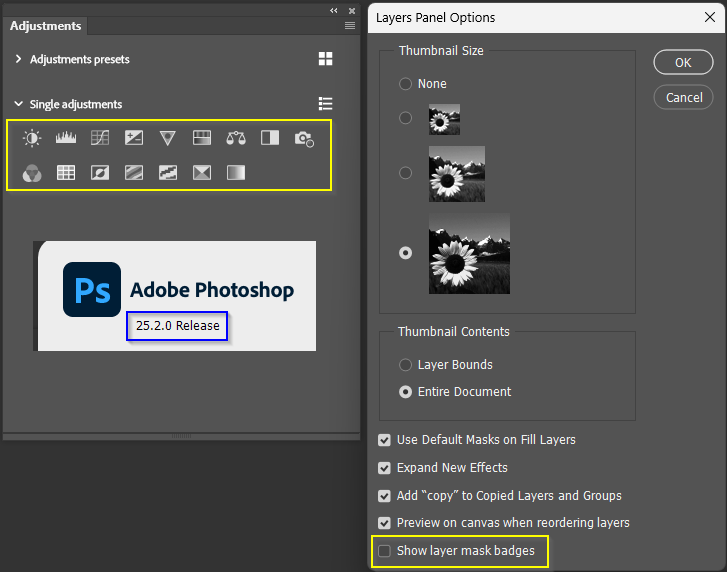
Was it just two days ago I was saying that we didn't know when the next full release update would go live?  The irony is that Adobe had already started rolling out V25.2.0 and it has given us back the original Adjustment Layer icon size, and it has the option to turn off Layer Mask badges.  Both these features were there in the 25.3 beta version.


image.png

Translate
Adobe Employee , Jul 18, 2023 Jul 18, 2023

Hello everyone! Thank you all for patiently waiting. We have built the "Classic view" into the adjustments panel. You can access it via the flyout menu of the adjustment panel. This will switch it back to the original layout with only the adjustments icons. Hope you enjoy this addition.

We have also released in Beta the functionality for you to save your own adjustments presets on the panel, but it is only accessible via the "Modern View". If you find yourself always applying the same effects to

...
Translate
85 Comments
Engaged ,
May 30, 2023 May 30, 2023

I updated photoshop to its latest version. However I miss old Adjustments panel layout. In  the previous version I found the Icons to be quite a bit bigger and also the layout to be better and more concise. Now every time I open the new panel I dont know where to look at. Find it difficult to find what I am looking for. Its time consuming. I vote to bring abck the old Adjustment panel.

Translate
Report
Participant ,
May 31, 2023 May 31, 2023

For all those who almost always use the adjustment panel, it needs to be visible, practical.

This means : having its options one click away without hiding your workplace.


This is exactly what the newly updated panel gets away from.


Before : réglage avant.png


After :réglage maintenant.png


  1.  Why adding a blank space between each pictogram? This takes way more space without bringing anything, therefore this is a horrible idea.
  2. Why making it mandatory to display those newbie features??

Honestly, I am shocked by how ridiculous this is. Those presets are not even browsable, they are not described effectively, and more than anything, they are useless. If you know how to use the adjustment panel this is exactly what you don't want to see. It takes too much space on your screen, it brings absolutely nothing but an amateur "hey! this is what you can doo 8) soo fresh dayuum" 2011-web-early-SoMe editor.


I think this update is a total nonsense.

I would expect at least to be able to hide these useless features ; and to reduce the space in order to make a viable UI. If your screen is just filled with a flock of gadgets that tell you "yahhhooo look at this sunshine effect", then you just can't work.


Even with the "old" panel, too much space was used. I think there should just be a simple floating window, containing absolutely nothing more than what is below :

réglage idéal.png


Thank you for understanding.

Translate
Report
Advocate ,
May 31, 2023 May 31, 2023

Having a very old PC, I have now also noticed it takes much longer to draw, probably fetching thumbs if that section is opened. We're not in 1990 anymore. Any dialog should *explode* onto the screen — even in 1991 😉

Opening the Layer Styles dialog by double-clicking on a layer takes more than a second here — a very tedious wait 😞

Translate
Report
Community Beginner ,
May 31, 2023 May 31, 2023

Good points. It would be nice to customize and edit the presets IF we wanted to use them.  A seperate removeable panel is needed.  To be able to customize the individual adjustment icons positioning would be great also, but let's focus on the adjustment presets for now

Translate
Report
Community Expert ,
May 31, 2023 May 31, 2023

Other issues with the "new" adjustments panel include:


_not being able to adjust the width/height as small as the "old" adjustments panel

  and still see all the icons.


ovn.png


_Alt/Option clicking on any of the adjustment icons brings up the New Layer properties dialog as in the old adjustments panel, but now after pressing OK the old style non modular adjustment layer dialog opens as opposed to the old adjustments panel where the modular properties panel adjustment panel opens causing other issues like not being able to record the adjustment in actions.

reported here by Signfeld

https://community.adobe.com/t5/photoshop-ecosystem-bugs/alt-click-on-curves-icon-does-not-record-its...


ocur.png


Translate
Report
Community Expert ,
May 31, 2023 May 31, 2023

Dag, you has eight likes on your post so far, which surely says something.  I absolutely HATE the new look.  Most of my panels are spread over two 24" screens with the UI at 100%.  Those screens are pushed left and right by a 32" 16:9 screen so my panel is 18" from my eyes, and the icons too small for to see comfortably.  I'd move the panel to my main screen if we were able to reduce its width to a single icon column, but that is not possible.


List mode does give us back the original sized icons, but I hate how spread out they are.  When you move the cursor to a panel, you don't want to then have to navigate up and down eight inches of screen to locate the icon you need.  It would be better if were able to fine tune the order the icons appear in list mode.  I also begrudge how much screen space I now have to allow the Adjustment Layer panel in list mode, but I have no choice because I can't comfortably see the small icons. Grrr.

image.png

My workaround is to move the Image > Adjustment shortcuts to the same Adjustment Layers, although I am not sure where I borrowed Ctrl Shift V from for Vibrance.  I have not yet got around to asigning those shortcuts to single key shortcuts (Function keys or keyboard G-keys) because I am hoping that well see a legacy panel in a future update.

image.png

Translate
Report
Community Expert ,
Jun 01, 2023 Jun 01, 2023

More issues with the "new" adjustments panel include:


_The order of the icons and flyout menu items has changed from the first iteration of the adjustments
panel in cs4/cs5, which followed the same order as the Image>Adjustments/Layer>New Adjustment Layer

menu items.
 
Starting in photoshop cs6 and lasting until photoshop 2023 (ps ver 24.4.1) the icon order was changed as

well as the flyout list order which are both different from each other as well as different from the

Image>Adjustments/Layer>New Adjustment Layer menu items.
 
Now again in photoshop 2023 (ps ver 24.5) while the icon order has stayed the same. the icon menu

flyout list has yet changed order again.
And still again when one switches to the "new" list mode in the "new" adjustments panel both the list in

the panel and flyout menu order are completely different each other and the icon view.
 
For the sake of consistency, shouldn't all the lists and icons be arranged in the same order as the traditional

Image>Adjustments/Layer>New Adjustment Layer menu items?


Photoshop CS4


adjpanelcs4.png


Photoshop CS6


adjpanelcs6.png


Photoshop 2023 (24.5) icon view


adjpanel2023a.png


Photoshop 2023 (24.5) list view


adjpanel2023l.png

Translate
Report
Community Beginner ,
Jun 02, 2023 Jun 02, 2023

Add me to the list of haters.  I just want the gimicky stuff gone and my *real* adjustment icons to be larger.

Translate
Report
Community Expert ,
Jun 02, 2023 Jun 02, 2023

@Pete.Green Can you make sure this feedback gets to the team please Pete?

Translate
Report
Explorer ,
Jun 05, 2023 Jun 05, 2023

Adding my voice to all the others. Adobe seems on a quest to make PS more "automatic" but besides the new adjustment panel presets taking up space and making the adjustments icons tiny or a list, the presets themselves are useless and even silly in most instances.  What are they thinking??? 

Translate
Report
Engaged ,
Jun 05, 2023 Jun 05, 2023

Hi all, I keep getting emails from the feed here on this topic. Is there a way to disable the notifications?

Translate
Report
Community Expert ,
Jun 05, 2023 Jun 05, 2023

Turn it off in your profile.

Translate
Report
Community Expert ,
Jun 05, 2023 Jun 05, 2023


There is another thread in the Photoshop Beta forum dated 17 March announcing the new panel and staff is asking for user feedback:

https://community.adobe.com/t5/photoshop-beta-discussions/adjustments-panel-with-presets-is-now-avai...

As of today, there are three replies and not one is negative.


Jane


Translate
Report
Community Expert ,
Jun 05, 2023 Jun 05, 2023

There is an inherent problem with polling that over the beta: people who use Photoshop in a production environment won't use the beta. Those are the users who work high speed and high volumes. I haven't installed it, for the simple reason that I can't risk any problems. I need this thing to work at all times. That includes the one I have at home, since I sometimes need to work from home.


As much as I'd like to play around with it for fun, I don't want to risk it.

Translate
Report
New Here ,
Jun 06, 2023 Jun 06, 2023

As others have said, and it cannot be said enough- if one is using Photoshop or any other product in a production environment, you simply do not have time to waste trying to disable unwanted new features or try to find where something you rely on has been hidden or keystrokes changed. So rule #1 when deploying some new idea should be to make it subservient to what is existing and allow the users to easily turn off anything new if they do not find it useful or productive. In the specific case of the Adjustments panel, the previous version worked great. Compact, easy to read, tried and true. Bring it back as it was and leave it alone. Add the presents option below and allow the user to turn this feature off by using the dropdown menu. 

Translate
Report
Advocate ,
Jun 06, 2023 Jun 06, 2023

re. Legacy Icons View

Tooltips should be sufficient for newcomers too (although the size and long formulation makes it less readable). If not, they can use the two other options to add an adjustment layer.


re. Size of Legacy Icons

Perfect on a Legacy 1920 x 1200 monitor.  4K users may have other desires.


re Create Custom Presets

We already can by using actions. OTOH, the previews in this new system for our own adjustments would be helpful if quick, but please have an option in the flyout so zero extra space will be taken up if someone doesn't want it. There are tons of cool panels and we need every pixel.


Re. "What do you think about creating your own adjustment presets? If we had this feature, would you want to see it with the legacy icons view?"

I'd prefer them in their own panel. If not, please also provide a flyout option to only see the presets (as more and more people will be getting custom panels with custom buttons. I already have adj layer icons on one so I can have more in less space and I can have the functionality mentioned down below).


adjustments.jpg


Please also confirm this bug and check if it came along with the recent developments...

Alt + click on Curves icon does not record its parameters into action (24.4.1 – 24.6b) http://community.adobe.com/t5/photoshop-ecosystem-bugs/alt-click-on-curves-icon-does-not-record-its-...


And while you're in that code, a longstanding wish by some is to make Ctrl + click add the adj layer already clipped.

Translate
Report
Community Expert ,
Jun 06, 2023 Jun 06, 2023

I have a new angle on the situation.  This is the beta version after a restart in my default workspace

image.png

And this is the panel in Essentials.  Both workspaces were reset, but the panel is sans icons.  I am sure it will come back after resetting Preferences, but that is a PITA.

image.png

Yes, a Preference reset fixed it.  


Translate
Report
Community Expert ,
Jun 06, 2023 Jun 06, 2023

That's a new twist. For me the icons came up present, but inactive. Nothing could wake them up.


What I don't understand is why it looks like the whole panel is loading up from the Adobe servers when it starts up, with all the blinking and reloading before it settles. Don't know if that's actually happening, but it's how it looks.

Translate
Report
Engaged ,
Jun 07, 2023 Jun 07, 2023

@FionaYu 


Please keep the legacy Icons ONLY.  No text or the list view.


Keep the size of Legacy icons as large as possible. No adjustments and no scaling bar.


And NO custom adjustment presets please.


Thank you

Translate
Report
Participant ,
Jun 08, 2023 Jun 08, 2023

Agreed that this needs to be an option to turn off. There is no way I'll ever use these presets, I don't want them wasting space on my screen. 
D Fosse, you say we got rid of the blue share button but I still have it? Is there a hidden setting somewhere? 

Translate
Report
Participant ,
Jun 08, 2023 Jun 08, 2023

@FionaYu Ideally the "legacy" option would just look the same as it always has, but I guess having different size options (like how layer thumbnails do) couldn't hurt, might be helpful for those with vision issues etc. As for user presets, can't imagine ever needing them, almost any time I'm using an adjustment layer it's dependant on the image. The only "presets" I ever use are some QC check layers at the top of my file but I have those created automatically with an action when I set up a new file so I wouldn't need presets for that. 

Translate
Report
Community Expert ,
Jun 08, 2023 Jun 08, 2023


@alexanderl16240166 wrote:

D Fosse, you say we got rid of the blue share button but I still have it


Go to Preferences > Interface > Neutral Color Mode


Jane


Translate
Report
Community Expert ,
Jun 08, 2023 Jun 08, 2023

@FionaYu 

Legacy Icons View

For switching back to the legacy view, do you still find it helpful to see text next to icons (Aka. the list view) OR do you prefer only having the legacy icons view?

My preference would be to have the ability to switch back to the old icons panel - it was compact but clear.

Size of Legacy Icons

What do you think of the size of the legacy icons? Should we make any adjustments to it, even providing a scaling bar so that you can slide up or down the icon sizes? 

The legacy icons were fine in size. Slightly larger than the new icons and most importantly they were sharp and clear whereas the new icons are both smaller and blurred.

Create Custom Presets

What do you think about creating your own adjustment presets? Would that be useful for your workflows? If we had this feature, would you want to see it with the legacy icons view? 

This partly exists within the properties panel for individual items. What of course that does not do is add several adjustment layers together for a combined effect. However, we can achieve that with actions (combined with the aforementioned adjustment presets).

If there is to be a preset panel, I would prefer it to be separate so users can make it visible, or not, as they choose.

With some of the changes I have recently, I feel like we  need Photoshop to run in two modes. One, for newcomers, with simple adjustments and presets. The second for more seasoned users running with the controls we need. This is not unusual in applications and the panel/ options/button set up could be associated with the saved workspace. That way everyone can be happy new or old.


Dave

Translate
Report
Adobe Employee ,
Jun 08, 2023 Jun 08, 2023

Thanks for your input, everyone! We have discussed this as a team and will be working on this panel option for you to only see the legacy adjustments panel. 

Translate
Report
Adobe Employee ,
Jun 08, 2023 Jun 08, 2023

For those of you who think creating custom adjustment presets on the panel might be useful for your workflows, please head on over to this thread and let us know your ideas! 

https://community.adobe.com/t5/photoshop-ecosystem-ideas/are-you-interested-in-creating-custom-adjus... 

Translate
Report