Exit
  • Global community
    • Language:
      • Deutsch
      • English
      • Español
      • Français
      • Português
  • 日本語コミュニティ
  • 한국 커뮤니티
0

Adjust sharpness does not save

New Here ,
Jul 06, 2017 Jul 06, 2017

Using the 'adjust sharpness' feature the pictures preview perfectly showing the effect but when I click on "OK" the sharpness disappears.  I am new to Elements 15

306
Translate
Report
Community guidelines
Be kind and respectful, give credit to the original source of content, and search for duplicates before posting. Learn more
community guidelines
LEGEND ,
Jul 06, 2017 Jul 06, 2017

dudleyc80415299  wrote

Using the 'adjust sharpness' feature the pictures preview perfectly showing the effect but when I click on "OK" the sharpness disappears.  I am new to Elements 15

For sharpening, try Unsharp mask or the High Pass filter

Use High Pass Sharpening For More Control In Photoshop Elements

Translate
Report
Community guidelines
Be kind and respectful, give credit to the original source of content, and search for duplicates before posting. Learn more
community guidelines
Community Expert ,
Jul 06, 2017 Jul 06, 2017

Sometimes the magnification or the zoom percent your viewing the image at makes a difference in whether one sees the effects of filters on an image.

Try viewing the image at 100% or actual pixels by double clicking on the Zoom Tool in the toolbox, then try the Adjust Sharpness and see if you still see the effect after clicking OK.
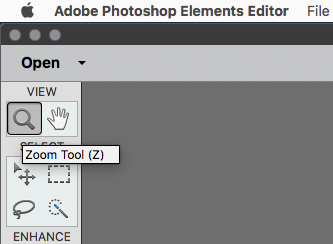

zoomt.png

Translate
Report
Community guidelines
Be kind and respectful, give credit to the original source of content, and search for duplicates before posting. Learn more
community guidelines
New Here ,
Jul 07, 2017 Jul 07, 2017
LATEST

Thanks to folk for their advice.  The problem that I had yesterday appears to have resolved itself.  I wonder if I had something like the caps lock or something else switched on that interfered with stuff.  As I said originally I could see that adjustment fine at 100% but when I hit 'save' the adjustment did not 'take'. I tested this out by undoing 'adjust sharpness' & then re-doing it but the undone picture did not revert to a sharp one.  Whatever.!!   Solved.

Translate
Report
Community guidelines
Be kind and respectful, give credit to the original source of content, and search for duplicates before posting. Learn more
community guidelines