Exit
  • Global community
    • Language:
      • Deutsch
      • English
      • Español
      • Français
      • Português
  • 日本語コミュニティ
  • 한국 커뮤니티
0

Enhancing colours

New Here ,
Dec 07, 2018 Dec 07, 2018

Hi, I took some photos earlier in the year with hundreds of bluebells in the foreground, but the colour of the flowers seemed a bit weak in the photos when I got home. I have elements 18. Can anyone suggest how I can make the Bluebells more "vibrant" in colour, without affecting the rest of the photo

Thanks

366
Translate
Report
Community guidelines
Be kind and respectful, give credit to the original source of content, and search for duplicates before posting. Learn more
community guidelines
Mentor ,
Dec 07, 2018 Dec 07, 2018

There are many ways. Here is just one.

Starting with this picture of bluebells I found in Google images.

sshot-1.jpg

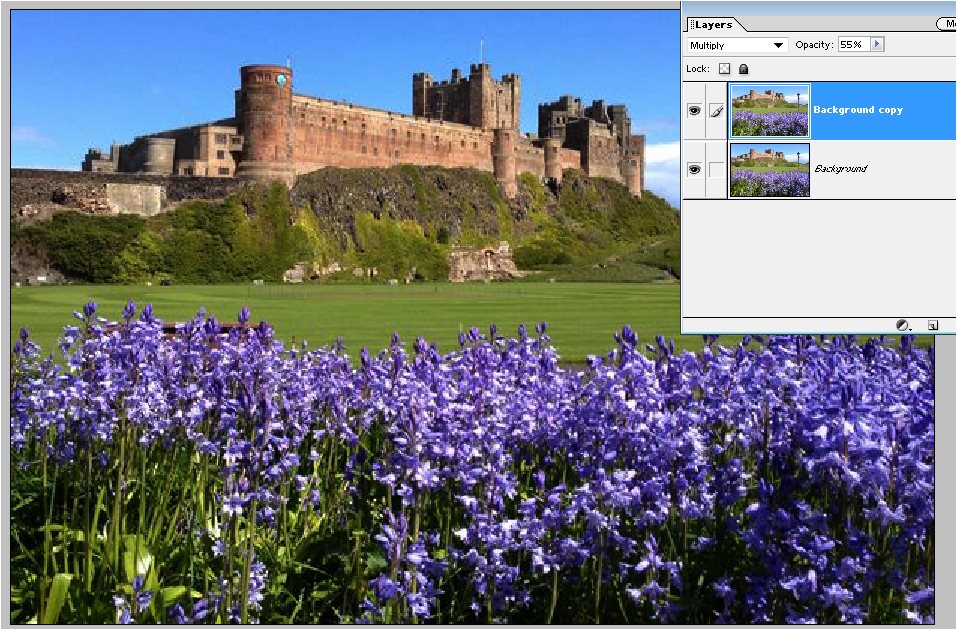
1. Duplicate the Background layer and set the duplicate layer's Blend Mode to Multiply.

This darkens the entire picture, but we will fix that later.

If the result on the bluebells is too extreme, lower the Layer's Opacity, which I did here (55%).
sshot-2.jpg

Now to restore everything other than the bluebells.

2. Add a Layers Mask to the duplicate layer. Fill the mask with black to restore the entire original picture.

3. Set the foreground/background color chips to their white & black defaults.

4. Activate the Brush tool with a soft brush. Paint the bluebells with white to reveal the new color.

If you paint too far, for example onto the grass, paint with black to restore the original. You can type "X" to toggle between white and black.

You can get similar results with other Blend Modes such as Color Burn and Linear Burn.

sshot-3.jpg

Translate
Report
Community guidelines
Be kind and respectful, give credit to the original source of content, and search for duplicates before posting. Learn more
community guidelines
New Here ,
Dec 16, 2018 Dec 16, 2018
LATEST

Many thanks

John

Translate
Report
Community guidelines
Be kind and respectful, give credit to the original source of content, and search for duplicates before posting. Learn more
community guidelines

