Exit
  • Global community
    • Language:
      • Deutsch
      • English
      • Español
      • Français
      • Português
  • 日本語コミュニティ
  • 한국 커뮤니티
0

Photoshop Elements 2021 - Zuschneiden/ Freistellen

New Here ,
Nov 22, 2022 Nov 22, 2022

Hallo, ich habe keine Ahnung, warum diese Funktion nicht mehr funktioniert. Ich kann kein Rechteck mehr nutzen beim Auswahlrechteck (die SW macht immer einen Kreis oder etwas Ovales draus obwohl auch unten beim Expertenmodus das Rechteck aktiv ist) und daher kann ich auch nicht mehr die Funktion "Freistellen" nutzen. Hat jemand eine Idee, warum das nicht mehr funktioniert?

TOPICS
Actions , Creative , Mac
590
Translate
Report
Community guidelines
Be kind and respectful, give credit to the original source of content, and search for duplicates before posting. Learn more
community guidelines

correct answers 1 Correct answer

Community Expert , Nov 22, 2022 Nov 22, 2022

So, as I understand you, the Tool Options show that the Rectangular Marquee is selected (not the Eliptical Marquee).

And the Feather is set to 0?:


Snap_2022.11.22_11h1m12s_001.png


If so, try  clicking on the "hamburger" icon at the right side of the tool bar.  This will give you a dropdown menu where you can reset the tool.

Snap_2022.11.22_11h4m10s_003.png


Translate
Community Expert ,
Nov 22, 2022 Nov 22, 2022

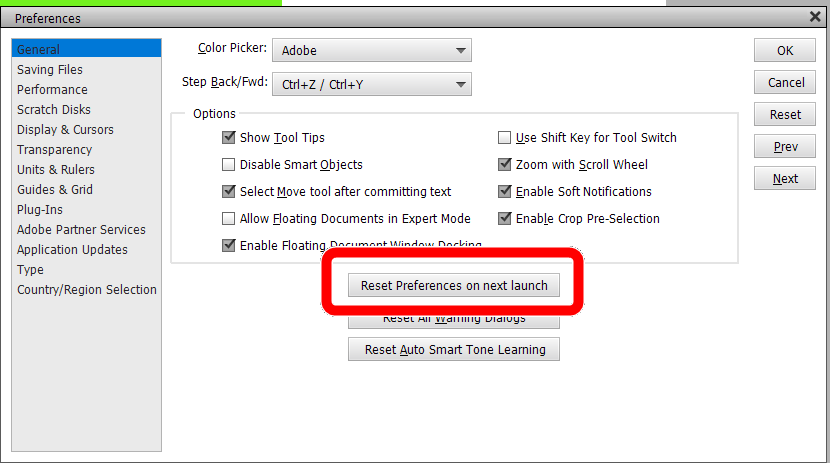
Try resetting the preferences file. Go to Edit>Preferences>General tab and click the Reset Preferences on next launch button.


Snap_2022.11.22_1h56m45s_002.png

Translate
Report
Community guidelines
Be kind and respectful, give credit to the original source of content, and search for duplicates before posting. Learn more
community guidelines
New Here ,
Nov 22, 2022 Nov 22, 2022

Vielen Dank für den Hinweis. Leider funktioniert das nicht und der Fehler ist immer noch vorhanden. Ich kann das Auswahlrechteck nicht nutzen und daher auch nicht freistellen. Danke dennoch...

Translate
Report
Community guidelines
Be kind and respectful, give credit to the original source of content, and search for duplicates before posting. Learn more
community guidelines
Community Expert ,
Nov 22, 2022 Nov 22, 2022

So, as I understand you, the Tool Options show that the Rectangular Marquee is selected (not the Eliptical Marquee).

And the Feather is set to 0?:


Snap_2022.11.22_11h1m12s_001.png


If so, try  clicking on the "hamburger" icon at the right side of the tool bar.  This will give you a dropdown menu where you can reset the tool.

Snap_2022.11.22_11h4m10s_003.png


Translate
Report
Community guidelines
Be kind and respectful, give credit to the original source of content, and search for duplicates before posting. Learn more
community guidelines
New Here ,
Nov 28, 2022 Nov 28, 2022
LATEST

Hey Greg, vielen Dank für die Hilfestellung. Es funktioniert wieder nach dem Reset, wie Du es beschrieben hast. DANKE! Ich wünsche Dir eine schöne Vorweihnachtszeit, ein besinnliches Weihnachtsfest und einen guten Rutsch ins neue Jahr. DANKE & viele Grüße

Translate
Report
Community guidelines
Be kind and respectful, give credit to the original source of content, and search for duplicates before posting. Learn more
community guidelines