
Exit
  • Global community
    • Language:
      • Deutsch
      • English
      • Español
      • Français
      • Português
  • 日本語コミュニティ
  • 한국 커뮤니티
0

zoomen auf Position des Mauszeiger´s nicht auf Bildschirmmitte (PSE 2019)

New Here ,
Sep 17, 2019 Sep 17, 2019

hallo


Habe seid kurzem PSE 2019 und davor mit PSE 12 gearbeitet. In der 2019 Version hab ich bemerkt, das beim zoomen mit gedrückter ALT-Taste und drehen am Mausrad es immer nur zur Bildschirmmitte vergrößert und nicht dahin, wo sich der Mauszeiger befindet. Bin leider nirgends fündig geworden, weder in den Mauseinstellungen noch im Programm selbst.

Vielleicht hatte ja jemand das selbe Problem ?!


PS.: in PSE 12 hat es noch bei mir funktioniert

1.6K
Translate
Report
Community guidelines
Be kind and respectful, give credit to the original source of content, and search for duplicates before posting. Learn more
community guidelines
Community Expert ,
Sep 17, 2019 Sep 17, 2019

Have you tried unchecking the box for Zoom with Scroll Wheel in the Edit>Preferences>General menu dialog?
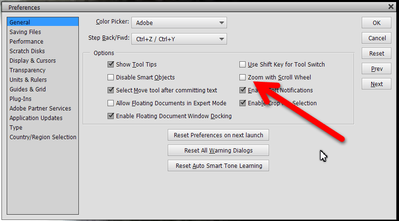
 

Snap10_2019.09.17_10h57m05s_001_.png


Translate
Report
Community guidelines
Be kind and respectful, give credit to the original source of content, and search for duplicates before posting. Learn more
community guidelines
New Here ,
Sep 17, 2019 Sep 17, 2019

hallo Greg_S.

leider macht das keinen Unterschied beim zoomen außer das ich bei markierter Checkbox die ALT-Taste nicht mehr drücken muss.

Translate
Report
Community guidelines
Be kind and respectful, give credit to the original source of content, and search for duplicates before posting. Learn more
community guidelines
Community Expert ,
Sep 17, 2019 Sep 17, 2019

I think this behaviour is 'as designed'. Zooming from the posistion of the mouse cursor would be very counterintuitive for me.

I don't see the point of not using the scroll wheel to zoom, there are better ways to  scroll or pan.

The Alt option does indeed enable you to scroll when the image is bigger than the window. Not necessarily faster than switching to the hand tool, but logical for switching from zoom to scroll.

Translate
Report
Community guidelines
Be kind and respectful, give credit to the original source of content, and search for duplicates before posting. Learn more
community guidelines
Enthusiast ,
Sep 17, 2019 Sep 17, 2019

Das man das Bild auch von "Hand" oder über den Navigator verschieben kann, wird Nighthawk79 wohl auch wissen.

Auch in PSE 14 konnte man, mit Positionierung des Mauszeigers (egal welches Werkzeug gerade aktiv ist), einen bestimmten Punkt im Bild per Scroolrad vergrößern.

Dabei blieb dieser Punkt immer in der Position des Mauszeigers.


Translate
Report
Community guidelines
Be kind and respectful, give credit to the original source of content, and search for duplicates before posting. Learn more
community guidelines
New Here ,
Sep 18, 2019 Sep 18, 2019
Danke für meine Verteitigung rw211 😉 das einziges was mir wohl bleibt ist und womit ich evtl. leben kann ist die Taste H. Ist aber halt immer blöd wenn man seinen "Workflow" abändern muss 😕
Translate
Report
Community guidelines
Be kind and respectful, give credit to the original source of content, and search for duplicates before posting. Learn more
community guidelines
New Here ,
Sep 18, 2019 Sep 18, 2019
Danke für deine Antwort. Wie rw211 schon schrieb; die Vergrößerung auf den Mauszeiger ging in früheren Versionen des Programmes. Es ist halt immer eine Umstellung seinen gewohnten Wokflow ändern zu müssen und da kann man unter Umständen das eine oder andere graue Haar danach mehr zählen 😉
Translate
Report
Community guidelines
Be kind and respectful, give credit to the original source of content, and search for duplicates before posting. Learn more
community guidelines
Enthusiast ,
Sep 18, 2019 Sep 18, 2019
Die Testversion von PSE 2019 hatte ich letztes Jahr schon einmal installiert. Von daher ist eine Installation sinnlos (Testzeitraum abgelaufen). Demnächst dürfte PSE 2020 (oder 18) erscheinen. Vlt. kann ich da das Problem nachvollziehen.
Translate
Report
Community guidelines
Be kind and respectful, give credit to the original source of content, and search for duplicates before posting. Learn more
community guidelines
New Here ,
Sep 20, 2019 Sep 20, 2019
ok, supi. Würde mich wenn du mich auf dem laufenden hälst.
Translate
Report
Community guidelines
Be kind and respectful, give credit to the original source of content, and search for duplicates before posting. Learn more
community guidelines
Enthusiast ,
Sep 22, 2019 Sep 22, 2019

Es sieht so aus, das es nach der "Foren-Umstellung" weniger User sich hier beteiligen...

Eventl. könnte dir auch das DSLR-Forum weiterhelfen.

https://www.dslr-forum.de/forumdisplay.php?s=080a56da2141fa46be42da57b726059e&f=22

Ggf. dort einen Link zu diesem Beitrag hier einfügen.


Translate
Report
Community guidelines
Be kind and respectful, give credit to the original source of content, and search for duplicates before posting. Learn more
community guidelines
Enthusiast ,
Oct 04, 2019 Oct 04, 2019
LATEST

@Nighthawk79,

ich habe heute mal die Testversion von PSE 2020 installiert.

Mauszeige auf eine beliebige Stelle im  Bild positioniert.

Sowohl mit über die "Alt-Taste" wie auch über das aktiverte Scrollrad funktioniert das Zoomen, wie es soll.

Translate
Report
Community guidelines
Be kind and respectful, give credit to the original source of content, and search for duplicates before posting. Learn more
community guidelines

