Exit
  • Global community
    • Language:
      • Deutsch
      • English
      • Español
      • Français
      • Português
  • 日本語コミュニティ
  • 한국 커뮤니티
0

Colour Management (Modify-Interpret) Completely Missing

Community Beginner ,
Feb 23, 2022 Feb 23, 2022

I can not convert footage back to log.
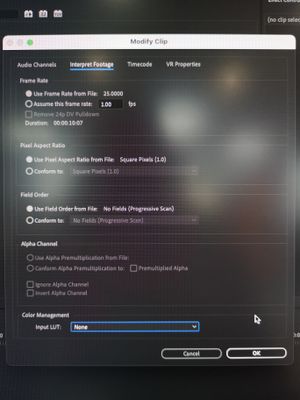
 

IMG_20220223_152220.jpg


We have two identical computers (Mac 2013 trashcan). Same OS and same Premiere Pro version and the other computer has the Color Management options as expected (below)

IMG_20220223_134804.jpg


I've gone through all options in Premiere and both computers seem to be set up the same.

I've also wiped and completely reinstalled Premiere.
Any ideas?


TOPICS
Error or problem , User interface or workspaces
475
Translate
Report
Community guidelines
Be kind and respectful, give credit to the original source of content, and search for duplicates before posting. Learn more
community guidelines

correct answers 1 Correct answer

Community Beginner , Feb 24, 2022 Feb 24, 2022

This was fixed by setting up a new user on the Mac.


This still needs to be addressed as you wouldn't know you had a problem unless you could compare with another computer.

Translate
LEGEND ,
Feb 23, 2022 Feb 23, 2022

@Kevin-Monahan , MR MAC , sir, can you assist?


Neil

Translate
Report
Community guidelines
Be kind and respectful, give credit to the original source of content, and search for duplicates before posting. Learn more
community guidelines
Community Beginner ,
Feb 24, 2022 Feb 24, 2022

This was fixed by setting up a new user on the Mac.


This still needs to be addressed as you wouldn't know you had a problem unless you could compare with another computer.

Translate
Report
Community guidelines
Be kind and respectful, give credit to the original source of content, and search for duplicates before posting. Learn more
community guidelines
New Here ,
Mar 15, 2023 Mar 15, 2023
LATEST

What do you mean by setting up a new user? My color management tab is greyed out and my Sony Venice MXFs shot raw are not being displayed raw by Premiere. They look as if they have a 709 LUT already on them even though they don't.

Translate
Report
Community guidelines
Be kind and respectful, give credit to the original source of content, and search for duplicates before posting. Learn more
community guidelines

