


- Home
- Premiere Pro
- Discussions
- Re: Premiere CC interpreting footage incorrectly (...
- Re: Premiere CC interpreting footage incorrectly (...
Premiere CC interpreting footage incorrectly (50fps to 12.5fps)

Copy link to clipboard
Copied
Hi,
I have some 50fps MPEG files in a .mov wrapper which I'm trying to edit. When I import them into Premiere the frame rate is interpreted as 12.5 and the videos look in slow motion. In the preview, some parts the video starts to jump in randomly order from some fotograms to others. If I force the frame rate as 50 (in the sequence settings) the audio plays back twice the speed and the image still look weird.
This started to happen after realising the last actualization of the Adobe Premiere software.
I used "Handbrake" but still have the same results.
Here I add some screenshots of the properties of the origin file and how the program interprets those files:
This is the file I'm trying to use:
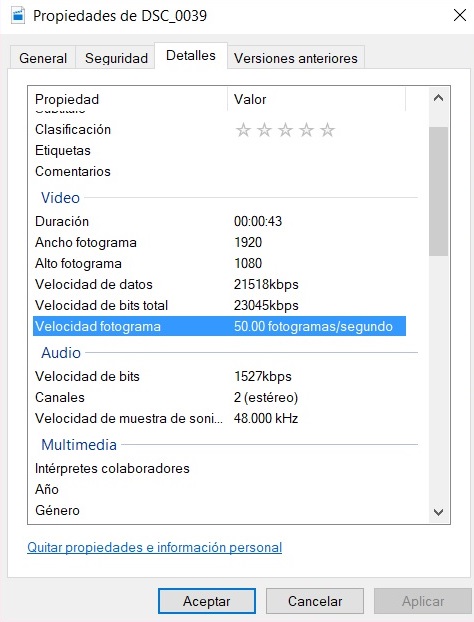
And here is how Premiere interprets the file:

All the videos that were film with this camera (Nikon 5200) present this problem. Before the actualization, I didn't had any problem to edit them. I imported a file recorded with a drone in 50fps to compare it, and it looks fine.
Thanks for your time and your help.


 5
Replies
5
5
Replies
5



Copy link to clipboard
Copied
If those "50fps" files are 50i ... interlaced ... then that is actually 25fps media. Interlaced means there's two half-images per frame, each one with alternating lines from the other.
Which doesn't answer why PrPro imports them as 12.5, but would explain why when you select interpret as 50, they're double-speed.
Neil
Copy link to clipboard
Copied
Hello Neil, thank you for your response! But even when I set the sequence at "25fps" it continues in slow motion. The audio is perfect when I import the files, the video is the only problem.
Thank you again for you help!


Copy link to clipboard
Copied
Would you mind running the clip through Media info and post the outcome in treeview here on the forum?


Copy link to clipboard
Copied
Would it also be possible for you to provide sample files for investigation? You can post a link here or DM me the link.
Thank you.

Copy link to clipboard
Copied
LorenaG,
It appears that there may be an issue with interlaced footage. Add your voice to this bug report: version 12.1.1 turns my 60i footage into 14.99fps. when i go back to 12.0.1 it processes the footage...
Thanks,
Kevin


Find more inspiration, events, and resources on the new Adobe Community
Explore Now
 AdChoices