


- Home
- Premiere Pro
- Discussions
- This file requires the HEVC codec, which is availa...
- This file requires the HEVC codec, which is availa...

Copy link to clipboard
Copied
I am a paid member and I'm signed in. Premiere Pro is at the latest version. Where do I get the necessary codec from?


 1 Correct answer


Hi Caryn,
It should have been resolved now. Please mention the version of Creative Cloud that you have. For that go to Burger menu of Creative Cloud application>Preferences>General.
If it is 4.6 try to check for the app updates from the same burger menu and make sure it is 4.7.0.400. If update doesn't work uninstall and reinstall Premiere Pro and Media Encoder.
//Vinay

 32
Replies
32
32
Replies
32


Copy link to clipboard
Copied
Premiere Pro CC 2018 (12.0.1) now supports QuickTime wrapped HEVC (AKA H.265) video files for Licenced users only.
please confirm the format of the file and the version of premiere pro cc your working with??
Adobe Certified Instructor, Professional and Expert
Copy link to clipboard
Copied
The file is from my GoPro, 120fps, 1080p, MP4
I'm using the latest version of Premiere Pro CC 12.1.0, Build 186
Copy link to clipboard
Copied
Is your Media Encoder Updated to the latest version??
And when you imported the clip in Premiere Pro with codec HEVC... Did premiere pro give you an option to enable HEVC codec??
Adobe Certified Instructor, Professional and Expert
Copy link to clipboard
Copied
>Is your Media Encoder Updated to the latest version??
Yes it is.
>And when you imported the clip in Premiere Pro with codec HEVC... Did premiere pro give you an option to enable HEVC codec??
No it does not, I just get this message
"This file requires the HEVC codec, which is available to Creative Cloud members" and a link to Adobe which does not offer any downloads
Copy link to clipboard
Copied
Hi Andrew,
Please let me know your Subscription plan with storage quota attached to it.
//Vinay
Copy link to clipboard
Copied
I have the Creative Cloud, All Apps plan with 1TB of storage 
After following the advice of Jim, it is now showing "Start Trial" for Premiere Pro
Copy link to clipboard
Copied
Hi Andrew,
I was afraid of that plan as we have encountered a bug where users are unable to obtain HEVC Codec (Importer and Exporter) for CCI All Apps account when being updated from 100 GB to 1TB.
The only workaround is to cancel this plan and purchase the default one which does not has any special storage quota other than default one which is 100 GB.
For Trial error follow the below KB.
Stop Adobe Creative Cloud from opening in trial mode after purchase
//Vinay
Copy link to clipboard
Copied
How can I cancel without paying a fee to cancel?
Copy link to clipboard
Copied
How to cancel your Adobe Creative Cloud plan or membership
I don't think you need to pay any cancellation fees as you are just changing the plan but in case you face any issues please Contact Customer Care
//Vinay
Copy link to clipboard
Copied
Oh for the love of god!
I've just switched plans, as you instructed and now I have been charged for the new plan, and my membership is for a year from today's date.
I can't get anyone on a chat to talk and there are no phone numbers I can call. Total bollox! NOT HAPPY!
Copy link to clipboard
Copied
Hi Andrew,
Sorry for this trouble.
If you cancel within 14 days of your order, you will receive a full refund.
How to cancel your Adobe Creative Cloud plan or membership
//Vinay
Copy link to clipboard
Copied
Fabulous
HOW DO I GET PREMIERE PRO TO WORK???
Copy link to clipboard
Copied
Hi Andrew,
You just need to change the plan but you can enjoy the benefits after cancellation as well.
Benefits of a free Adobe Creative Cloud membership
//Vinay
Copy link to clipboard
Copied
To anyone who finds this thread. DON'T follow any of the steps outlined above. They don't work. What you will end up with is all of your apps showing "Start Trial".
Copy link to clipboard
Copied
After over an hour on the phone with "tech support" I am left with no access to the apps I am paying for, everything is telling me I need a subscription, which I have.
Cancelling everything and uninstalling everything.
I'll make a new account and try again.
One
Last
Time.
If this doesn't work then I'm moving on, life is too short.
Just to be clear, what ever you do, DON'T follow any of the steps in this exchange, it won't help you!
Copy link to clipboard
Copied
And now I don't have any plan. Awesome.

Copy link to clipboard
Copied
Hang on... what???
I need and use the 1TB storage
I also use, and need to be able to convert HEVC files
In what way can this possibly be considered a "solution"?

Copy link to clipboard
Copied
Any luck with this? Haven't been able to use HEVC in AME 2018 for a month now...

Copy link to clipboard
Copied
Im on a 100GB "All Programs" Plan and i get the same Error

Copy link to clipboard
Copied
Open Premiere Pro and from the Help menu, sign out. Close down PP, restart the computer, and sign back into the CC desktop app.

Copy link to clipboard
Copied
This worked for me. Thanks!

Copy link to clipboard
Copied
I'm also suffering from the same issue. I have over 40 hours of H.265 footage and I don't know whether I should wait for the update as promised in this thread: Missing codecs H265 (HEVC) in Adobe Media Encoder CC 12.0 (Build 202) or just start converting everything into a different codec, which will take me days.
Adobe please do something, it's June already!
Copy link to clipboard
Copied
tambien tengo este problema relacionado con el archivo HEVC , me permite añadirlo en premiere pero no genera proxies pues al abrirse media encoder aparece este mensaje.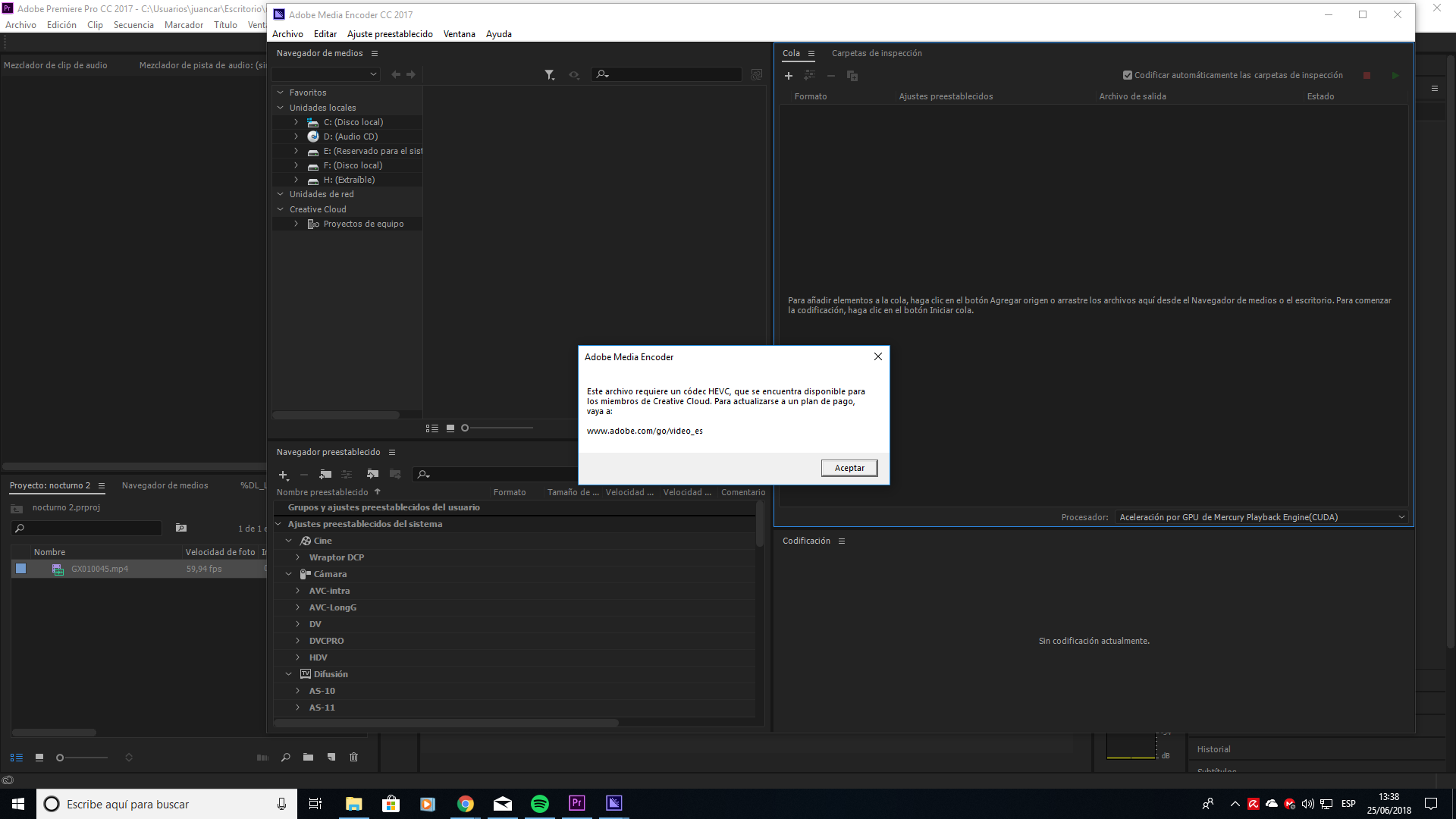

Copy link to clipboard
Copied
Still seems to be a problem. Fresh Windows install with fresh Creative Cloud and AME installs. No HEVC.
This is maddening. Adobe this has been an issue for the better part of a year! What's the deal?

-
- 1
- 2

Find more inspiration, events, and resources on the new Adobe Community
Explore Now
 AdChoices