
Participant
January 12, 2020
Answered

"Media cache directory" issue : Premiere Rush is not openable

  • January 12, 2020
  • 1 reply
  • 2397 views

Premiere Rush V1.2.12 built 10.

Hi,

Trying to start working with Premiere Rush but everytime the process blocks on the same issue. When starting, the following message displays : 
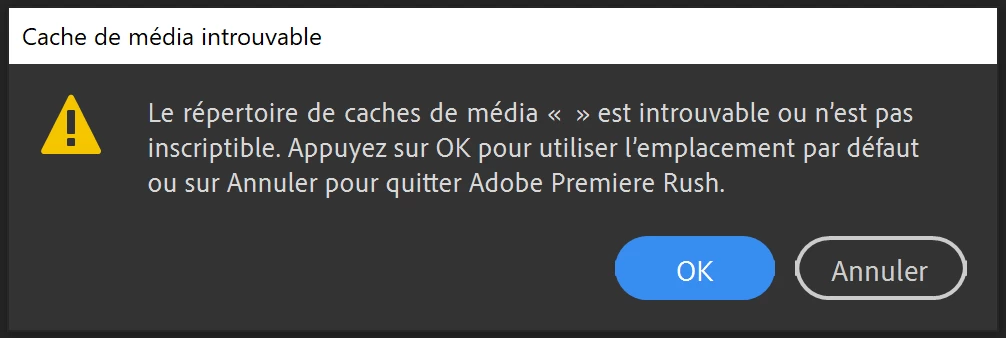
At first, I thought hitting "ok" would re-initialize the media cache directory enabling me to work. But, the software blocks when opening a new project or anything : it stays at "preparing the project" for hours. I tried to download the soft again, add a new directory, change version etc... Nothing worked.


Any idea on how I could set this issue ?

Should you need other informations, please ask me. Thank you for your help.

This topic has been closed for replies.
Correct answer Kartika Rawat

Hi there!

Welcome to the community. I see that you're unable to launch Premiere Rush.

Please try these steps:

  1. Press Windows+R and type %appdata% 
  2. Go to Roaming > Adobe > Common and rename the Media Cache and Media Cache Files folders to  Media cache_old and Media Cache Files_old respectively.
  3. Go to Documents > Adobe and rename the Premiere Rush folder to Premiere Rush_Old.

Let us know if it works.

Thank you,

Kartika


1 reply

Kartika Rawat
Community Manager
Kartika RawatCommunity ManagerCorrect answer
Community Manager
January 13, 2020

Hi there!

Welcome to the community. I see that you're unable to launch Premiere Rush.

Please try these steps:

  1. Press Windows+R and type %appdata% 
  2. Go to Roaming > Adobe > Common and rename the Media Cache and Media Cache Files folders to  Media cache_old and Media Cache Files_old respectively.
  3. Go to Documents > Adobe and rename the Premiere Rush folder to Premiere Rush_Old.

Let us know if it works.

Thank you,

Kartika


Participant
January 19, 2020

Hi Kartika,

It worked perfectly. I'm very satisfied that Adobe Premiere Rush works perfectly. Thank you so much for you help !

Kartika Rawat
Community Manager
Community Manager
January 20, 2020

Happy to help 🙂