 Adobe Community

- Home
- RoboHelp
- Discussions
- Any Way To Remove Default "Click here to see this ...
- Any Way To Remove Default "Click here to see this ...

Copy link to clipboard
Copied
When you go to a direct page link on a doc created using the "Responsive" output, you are shown a full page document with a message at the top saying "Click here to see this page in full context". Personally, I have NO issue with this, but my employer hates it and wants links to open in full context with the ToC on the left as normal.
So, is there any way to disable this behaviour and have links always open in full context eith the ToC? Even if it means manually editing source files? I've been looking around and only seem to find topics related to older versions, some of which reference an option to disable this, but that option no longer seems to exist. 😞


 1 Correct answer


I thought you just wanted to see the topic without that link. To see the TOC etc and the topic see RH2020 Calling Context Sensitive Help (grainge.org) for how to structure the URL or Map call.
________________________________________________________
See www.grainge.org for free Authoring and RoboHelp Information

 6
Replies
6
6
Replies
6


Copy link to clipboard
Copied
What method are you using to call the CSH help? Have you tried any other presets?
Copy link to clipboard
Copied
I think that wording is in the Language file and can be set to be blank or something your employer likes. Just wondering how they expect users to move to other parts of the help?
________________________________________________________
See www.grainge.org for free Authoring and RoboHelp Information
Copy link to clipboard
Copied
Hmmm.... I don't think I'm clear on this! So, what has been requested is that when you go to a page using a link (eg: https://docs.flightsimulator.com/html/Introduction/SDK_Overview.htm), instead of seeing this:

You see this:
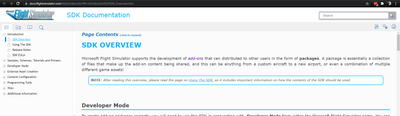
Note that the ToC is visible, and there is no need to click on any text at the top. The page opens directly on the full context.
Does that make sense now?
Copy link to clipboard
Copied
I think your answer is right there - look at the URL of the second image - try calling it that way & see the resultyou get.
Copy link to clipboard
Copied
I thought you just wanted to see the topic without that link. To see the TOC etc and the topic see RH2020 Calling Context Sensitive Help (grainge.org) for how to structure the URL or Map call.
________________________________________________________
See www.grainge.org for free Authoring and RoboHelp Information
Copy link to clipboard
Copied
Thanks Peter! I see the answer right there on your page... Excellent!


 AdChoices