- Home
- RoboHelp
- Discussions
- Cannot Create a pdf output in RoboHelp 2017
- Cannot Create a pdf output in RoboHelp 2017

Copy link to clipboard
Copied
Please could someone advise how to create a PDF output in RH 2017? I have configured the settings for printed output, but it just creates Word docs. I must be missing something. Thanks for any advice.


 1 Correct answer
Its working OK now, thanks. There was a PDF addon installed that was preventing RoboHelp create PDFs. After uninstalling this, PDFs could then be created.

 12
Replies
12
12
Replies
12


Copy link to clipboard
Copied
What do you have set here?
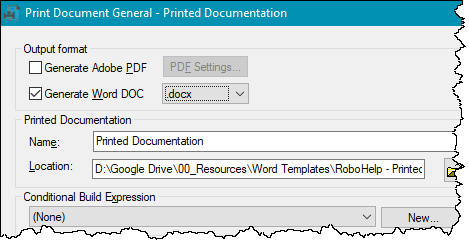
I have known it to fail to create a Word doc when that option is set but with a dialog telling you that.
I don't think that if the PDF check box is selected that I have seen anyone report it has then created a Word document instead. The PDF might fail but again with a warning so if both check boxes are selected you might just get the Word part.
Updates applied?
________________________________________________________
See www.grainge.org for free Authoring and RoboHelp Information
Copy link to clipboard
Copied
Hi. I have 'Generate Adobe PDF' selected, and all updates applied. I have installed Java, and set the environment variable to the installation folder. I cancelled the output after I saw that Word files were being created. I haven't restarted the PC since adding Java.
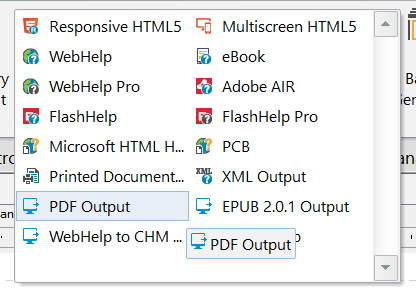
The PDF icon is not shown (see attached), which might indicate a problem perhaps. Thanks
Copy link to clipboard
Copied
Please use the photo icon to insert images within the post. Some supporters will not open attachments for security reasons and if you do download, you are then not seeing the image inline with the text. Then thanks to a quirk of this forum you have to close the thread and reopen it before you can reply. Crazy but that's the way it is.
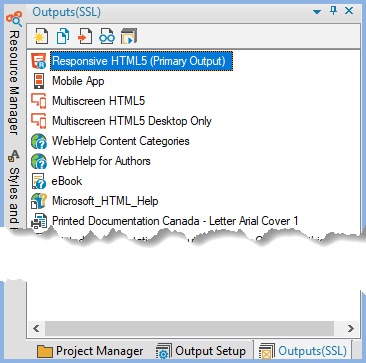
I have looked at the image and that appears to be from the ribbon. When you double click one of those it should open the dialog I have shown. You can also go to the Output tab double click the SSL and see that screen.
________________________________________________________
See www.grainge.org for free Authoring and RoboHelp Information
Copy link to clipboard
Copied
I have done this, and specified PDF output, but no luck I'm afraid.
Copy link to clipboard
Copied

Here is the image I referred to. I am doing exactly as you advise. Do I need to configure anything else in RoboHelp to get PDF output working please?
Copy link to clipboard
Copied
Yes, what I said, double click the SSL so that you can see the screen with the options.
________________________________________________________
See www.grainge.org for free Authoring and RoboHelp Information
Copy link to clipboard
Copied
There must be some configuration I am missing. Are there any other settings I could check?
Copy link to clipboard
Copied
Create a new project with just a couple of topics to see what happens there. That will establish if it is general issue or just this project.
________________________________________________________
See www.grainge.org for free Authoring and RoboHelp Information
Copy link to clipboard
Copied
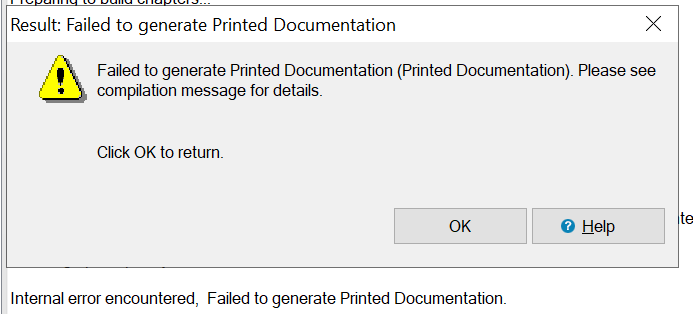
I tried this. When it finished I got the following. Not very helpful unfortunately.
Copy link to clipboard
Copied
So that I am clear, that dialog is with the new project using new topics and the default CSS, correct?
Next thing to try is changing to Word and if that generates, create your PDF from there.
________________________________________________________
See www.grainge.org for free Authoring and RoboHelp Information
Copy link to clipboard
Copied
That's correct. Word generated OK. and I could create the PDF from there. Thanks
Correct answer by
Dennetti
AUTHOR
Copy link to clipboard
Copied
Its working OK now, thanks. There was a PDF addon installed that was preventing RoboHelp create PDFs. After uninstalling this, PDFs could then be created.


Find more inspiration, events, and resources on the new Adobe Community
Explore Now
 AdChoices