


flash help project files

Copy link to clipboard
Copied
Hi everyone
Can anyone tell me if I wanted someone outside of my company to review my flash help project? What files do I need to send them in a zip file? I am using Robohelp for HTML version 8?
thanks
Caryn


 6
Replies
6
6
Replies
6


Copy link to clipboard
Copied
same with the web help format - what files would I need for that one?
thanks
Caryn

Copy link to clipboard
Copied
Hi there
Just right-click pretty much anywhere in the Project Manager pod or on a topic and choose Explore...
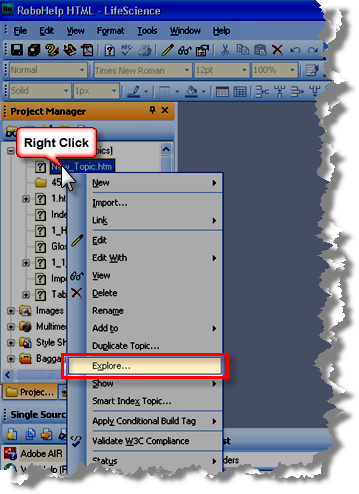
You are looking for a folder named !SSL!\WebHelp or !SSL!\FlashHelp (unless you decided to move it - but if that were the case you likely wouldn't be asking where it is).
Cheers... Rick 
| Helpful and Handy Links RoboHelp Wish Form/Bug Reporting Form Begin learning RoboHelp HTML 7 or 8 within the day - $24.95! |

Copy link to clipboard
Copied
i will try all files in this folder
thanks
Caryn
Copy link to clipboard
Copied
The person i send the project files cannot open my help file still. They get the mesage cant display page. They have internet explorer 8 is that why they cant open a flash file.
thanks
Caryn Drovie
Copy link to clipboard
Copied
Hi there
Ask them to visit the URL below:
http://www.adobe.com/shockwave/welcome/
That page will advise if the components are installed. If not, I believe it will offer links allowing the needed components to be installed.
Cheers... Rick
| Helpful and Handy Links RoboHelp Wish Form/Bug Reporting Form Begin learning RoboHelp HTML 7 or 8 within the day - $24.95! |
Copy link to clipboard
Copied
Rick
That did not work - exactly what files do they need me to send them for the flash file with Internet explorer 8 to work?
this is what the other person gets -
I get the frames but the one on the left cannot display. There is a message that Internet Explorer has restricted ActiveX. When I click on the message to allow ActiveX, I loose the frames and receive a message that Internet Explorer cannot display page.
thanks
Caryn


Get ready! An upgraded Adobe Community experience is coming in January.
Learn more
 AdChoices