Exit
  • Global community
    • Language:
      • Deutsch
      • English
      • Español
      • Français
      • Português
  • 日本語コミュニティ
  • 한국 커뮤니티
0

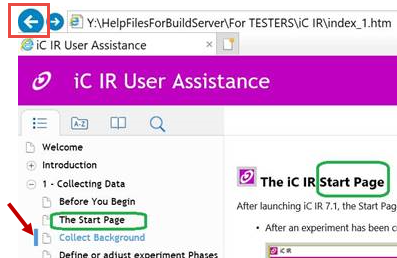
In IE11, Nav pane is not updated when the user hits the BACK button

Explorer ,
Aug 02, 2018 Aug 02, 2018

I'm using IE 11 and RH2017, and when a user clicks through the help files, then hits the BACK button on the browser, the main frame with the help page reverts to the prior page, but the Navigation pane remains unaffected.
749
Translate
Report
Community guidelines
Be kind and respectful, give credit to the original source of content, and search for duplicates before posting. Learn more
community guidelines
Community Expert ,
Aug 02, 2018 Aug 02, 2018

What flavour of output is this one?

Translate
Report
Community guidelines
Be kind and respectful, give credit to the original source of content, and search for duplicates before posting. Learn more
community guidelines
Explorer ,
Aug 02, 2018 Aug 02, 2018

I don't understand what you mean.

Translate
Report
Community guidelines
Be kind and respectful, give credit to the original source of content, and search for duplicates before posting. Learn more
community guidelines
Community Expert ,
Aug 02, 2018 Aug 02, 2018

Is it a WebHelp or Responsive HTML5 set of output?

Translate
Report
Community guidelines
Be kind and respectful, give credit to the original source of content, and search for duplicates before posting. Learn more
community guidelines
Explorer ,
Aug 02, 2018 Aug 02, 2018

Well, yes, I specified "I'm using IE 11 and RH2017"....

Oh. . Responsive HTMl5.

Yes, I have all the updates. I installed your JS patch a few months ago, as well.

Translate
Report
Community guidelines
Be kind and respectful, give credit to the original source of content, and search for duplicates before posting. Learn more
community guidelines
Community Expert ,
Aug 02, 2018 Aug 02, 2018

No sweat - you had a little typo in your original post. I'll move this one over.

Translate
Report
Community guidelines
Be kind and respectful, give credit to the original source of content, and search for duplicates before posting. Learn more
community guidelines
Explorer ,
Aug 02, 2018 Aug 02, 2018

Oh sorry.

Translate
Report
Community guidelines
Be kind and respectful, give credit to the original source of content, and search for duplicates before posting. Learn more
community guidelines
Community Expert ,
Aug 02, 2018 Aug 02, 2018

OK you have the patches but did you see my post above about setting up the layout again?


See www.grainge.org for free RoboHelp and Authoring information.

@petergrainge

Help others by clicking Correct Answer if the question is answered. Found the answer elsewhere? Share it here. "Upvote" is for useful posts.
Translate
Report
Community guidelines
Be kind and respectful, give credit to the original source of content, and search for duplicates before posting. Learn more
community guidelines
Explorer ,
Aug 02, 2018 Aug 02, 2018

Yes I did. Thanks. Is this then related to the fact that I work on my RH projects on a network drive and not my local C drive?

Translate
Report
Community guidelines
Be kind and respectful, give credit to the original source of content, and search for duplicates before posting. Learn more
community guidelines
Community Expert ,
Aug 02, 2018 Aug 02, 2018

You haven't indicated whether it works when you look at the RoboHelp Tour. That will tell you whether or not it is your project. If it works OK for the Tour, then something is wrong with your project and most likely the layout needs updating as I suggested.

I doubt it is the location but one thing at a time.


See www.grainge.org for free RoboHelp and Authoring information.

@petergrainge

Help others by clicking Correct Answer if the question is answered. Found the answer elsewhere? Share it here. "Upvote" is for useful posts.
Translate
Report
Community guidelines
Be kind and respectful, give credit to the original source of content, and search for duplicates before posting. Learn more
community guidelines
Explorer ,
Aug 02, 2018 Aug 02, 2018
LATEST

Yes Robo Tour works.

I reapplied the layout and it didn't work. I'll call tech support.

Translate
Report
Community guidelines
Be kind and respectful, give credit to the original source of content, and search for duplicates before posting. Learn more
community guidelines
Community Expert ,
Aug 02, 2018 Aug 02, 2018

I guess you mean RoboHelp 2017.

Take a look at the RoboHelp Tour on my site. It seems to be working OK there.

Do you have both RoboHelp updates applied?

If not, apply them first.

Then even if you do have them applied, load a fresh copy of the layout by clicking the Gallery button in the the output settings. You will need to amend the name so that it does not duplicate an existing layout. You will lose your customisation but test that to see if it fixes the issue.


See www.grainge.org for free RoboHelp and Authoring information.

@petergrainge

Help others by clicking Correct Answer if the question is answered. Found the answer elsewhere? Share it here. "Upvote" is for useful posts.
Translate
Report
Community guidelines
Be kind and respectful, give credit to the original source of content, and search for duplicates before posting. Learn more
community guidelines
Resources
RoboHelp Documentation
Download Adobe RoboHelp