 Adobe Community

- Home
- RoboHelp
- Discussions
- In RH2019, new ui, parse error when trying to conf...
- In RH2019, new ui, parse error when trying to conf...

Copy link to clipboard
Copied
I have added the following code to the header of the master page:
<!-- Global site tag (gtag.js) - Google Analytics -->
<script async src="https://www.googletagmanager.com/gtag/js?id=UA-000000000-0" ></script>
<script>
window.dataLayer = window.dataLayer || [];
function gtag(){dataLayer.push(arguments);}
gtag('js', new Date());
gtag('config', 'UA-000000000-0');
</script>
where UA-000000000-0 is my Google Analytics Tracking ID.
And Robohelp is giving me a parse error for the first line of the script saying invalid character s and underlining the s of the src. I tried adding it this way
<script src="https://www.googletagmanager.com/gtag/js?id=UA-000000000-0" async ></script>
(as I found a website that seemed to suggest that you add the async at the end) but then got Invalid character > underlining the > next to async.
I got this code from the Google Analytics website.


 1 Correct answer


I think it's actually the async bit. Try changing to:
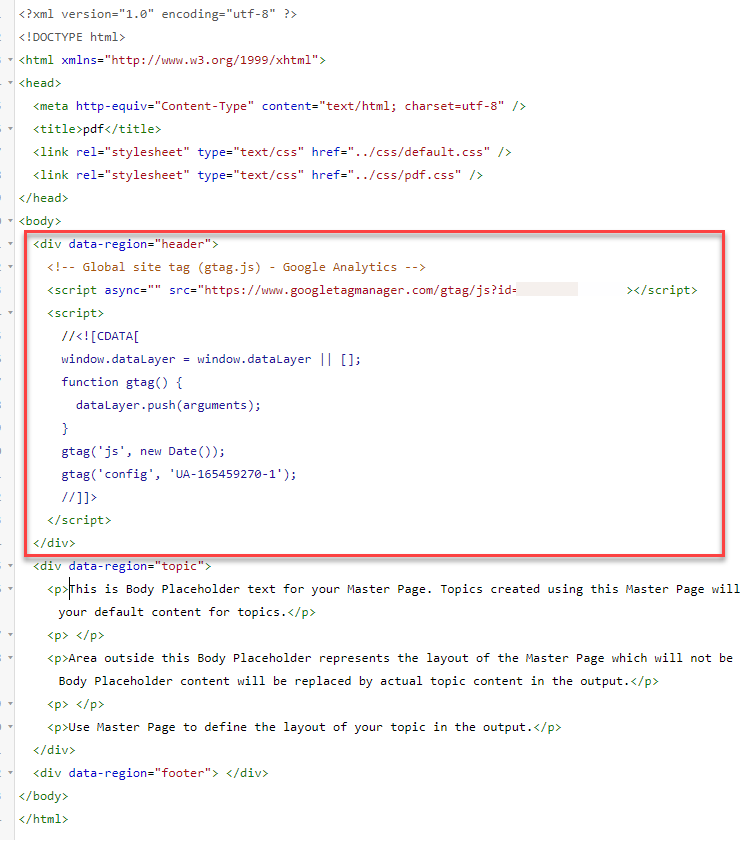
<script async="" src="https://www.googletagmanager.com/gtag/js?id=UA-000000000-0" ></script>

 5
Replies
5
5
Replies
5


Copy link to clipboard
Copied
Try adding a forward slash after the closing double quote marks. I had something similar with Google Fonts.
Copy link to clipboard
Copied
I think it's actually the async bit. Try changing to:
<script async="" src="https://www.googletagmanager.com/gtag/js?id=UA-000000000-0" ></script>
Copy link to clipboard
Copied
Thank you very much Amebr, that worked!

Copy link to clipboard
Copied
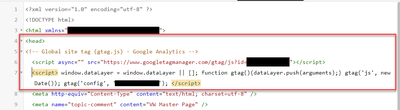
Thank you! It seems to be working, indeed. The error message is gone now. Do you know if the location of this script is correct (within the <head> section)?
Copy link to clipboard
Copied
Mine looks like this:


 AdChoices