


- Home
- RoboHelp
- Discussions
- Logo in top left corner does not display
- Logo in top left corner does not display
Logo in top left corner does not display

Copy link to clipboard
Copied
Hello,
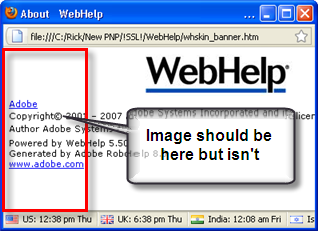
I have upgraded my RH x5 to RH 8.0.2. I have placed a logo in the 'About' section of the skin, but it does not display when I generate it in WebHelp.
It worked in X5, so I'm sure it's and easy fix.
That's it! Thanks!


 4
Replies
4
4
Replies
4


Copy link to clipboard
Copied
Hi there
Please take a moment to report this as a bug. It's something that broke in I belive version 7.
The only workaround I'm aware of is to stash a copy of a working HTML page that stores this, then substitute it each time after you generate.
Link is in my sig.
Cheers... Rick 
| Helpful and Handy Links RoboHelp Wish Form/Bug Reporting Form Begin learning RoboHelp HTML 7 or 8 within the day - $24.95! |

Copy link to clipboard
Copied
Thanks for the quick feedback!
I'm sure this won't make a difference, but I meant to refer to the top right, not left. Doh!
Copy link to clipboard
Copied
Hi there
Ahhh, the button in the main toolbar should show, yes. I thought you were referring to a custom image you supplied for the little window that appears when the skin toolbar button has been clicked. That one has the issue.
For example:
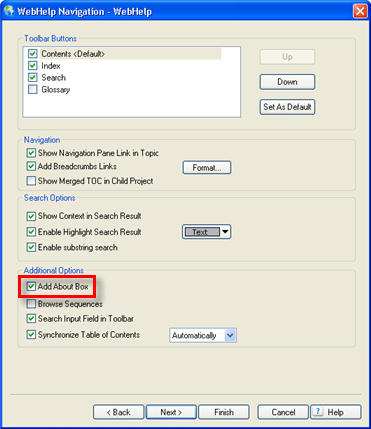
My guess is that you need to enable the "Add About Box" option. I think version 7 and 8 have it turned off by default.
I would also encourage everyone to please submit the other as a bug so it will gain higher priority with Adobe!
Cheers... Rick
| Helpful and Handy Links RoboHelp Wish Form/Bug Reporting Form Begin learning RoboHelp HTML 7 or 8 within the day - $24.95! |
Copy link to clipboard
Copied
Hi there,
Yes, that worked! Thank you! I knew it was something small.
I have reported the bug to Adobe!
Thanks...Syliva


 AdChoices