


- Home
- RoboHelp
- Discussions
- RoboHelp reordered my linked FM files
- RoboHelp reordered my linked FM files
RoboHelp reordered my linked FM files

Copy link to clipboard
Copied
I have a RoboHelp project that is linked to a FrameMaker book. I have been having problems with the linking - I make changes to the FM files and update the RoboHelp project but the changes don't always take effect - so I shut down both programs. I opened both programs along with the FM book and the RH project to find that my RH project files are totally in a different order than they were and then the FM files. I have closed and reopened RH but the files are still out of order. What would cause this to happen and how do I fix it? Do I have to delete the linked book and re-add it to fix the ordering of the files?
Please help - very frustrated with this tool...


 3
Replies
3
3
Replies
3


Copy link to clipboard
Copied
Hi there
If you click the A-Z icon in the Project Manager pod, does the order come back?
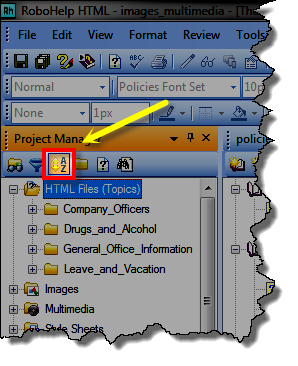
Cheers... Rick 
Copy link to clipboard
Copied
Hi Rick,
Clicking on the A-Z icon doesn't make any changes to the files at all.
Copy link to clipboard
Copied
Hmm, doing another update seems to have finally fixed that issue. Please let me know if you have any ideas on what could have caused it.
Also of note, I am still having what appear to be linking issues between FM and RH. Some changes that I make in FM do not seem to make their way to RH. Not sure how to resolve.


Get ready! An upgraded Adobe Community experience is coming in January.
Learn more
 AdChoices