


- Home
- RoboHelp
- Discussions
- TOC disappears after allow blocked content
- TOC disappears after allow blocked content

Copy link to clipboard
Copied
I have a Robohelp 9 project (single sourced through FrameMaker)
I can compile the help and run. When I view it, I see the full help along with the "Allow blocked content" message.
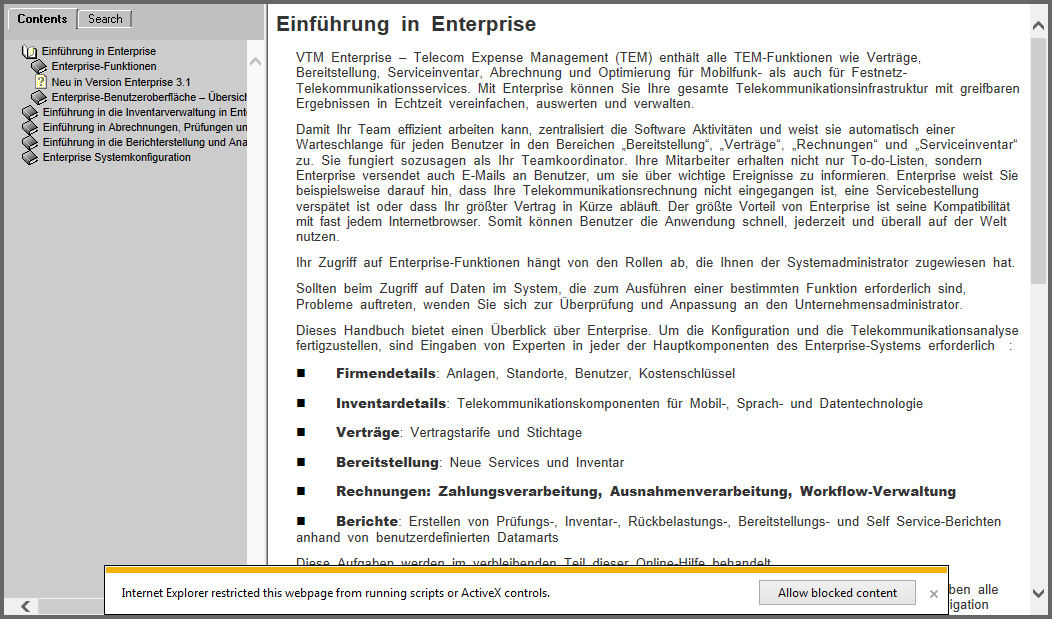
When I click Allow Blocked Content, my help appears but now the TOC is missing. (see images below)
I have been generating the help for the same way for a long time and this is the first time I have seen this problem.
I did install/uninstall Robohelp 10, but I have built help (albeit a different project) successfully after that
I do not really know what scripts are running here and blocked. Has anyone seen this and can anyone help?
Thank you!



 1 Correct answer
That's what I thought, but with problems like these, one starts to get desperate!
I did reinstall RH 9 and applied all updates. The problem still occurs locally, but I am able to run files from the web site succcessfully. Takes a bit more testing time, but a good validation.
Thanks for all your help!

 8
Replies
8
8
Replies
8



Copy link to clipboard
Copied
What version of IE? You may have to add some tweaks to it to get it to work with IE10 or 11.
Copy link to clipboard
Copied
Thanks Jeff.
It occurs in Chrome as well as IE 11, so I doesn't appear to be browser specific.
Haven't tested IE 10.
What tweaks would you recommend?
--Amy
Copy link to clipboard
Copied
The Chrome fix is here - http://forums.adobe.com/message/5775431#5775431
The IE10/11 tweak is here - http://forums.adobe.com/message/5765240#5765240#5765240
I’ve also had to add my local LAN server to IE10’s list of Trusted Sites (because the WebHelp that I create is located on client’s LAN servers, not on the web)
Copy link to clipboard
Copied
Hi Jeff,
Thanks again. I see these solutions refer to RH 10. I am using RH9.
I upgraded to TCS 4, had problems, and uninstalled. I had built and displayed help successfully after that.
I just want to make sure any changes I make won't break RH9 further
Thanks!
Copy link to clipboard
Copied
Well, you’re only messing around with the output files, so there’s no danger in that – just regenerate the help again ;>)
Copy link to clipboard
Copied
Sadly, I'm not having much luck. The Chrome switch seems to work, but on IE, the file replacement causes the contents to flicker now rather than just hide the TOC. It never loads successfully after allowing blocked content.
I therefore copied the output to a web server and tried running it there. I'm seeing the same problems, which indicates to me that something is corrupt in my WebHelp build out of Robohelp.
I'm trying reinstalling RH9 now, but should that fail, do you know if RH10 would work successfully with the rest of my TCS 3.5 installation?
Copy link to clipboard
Copied
I forget what version of RH came with TCS3.5 – regardless, you can’t update each component separately and expect it to work well together.
Correct answer by
AMCGracer
AUTHOR
Copy link to clipboard
Copied
That's what I thought, but with problems like these, one starts to get desperate!
I did reinstall RH 9 and applied all updates. The problem still occurs locally, but I am able to run files from the web site succcessfully. Takes a bit more testing time, but a good validation.
Thanks for all your help!


Get ready! An upgraded Adobe Community experience is coming in January.
Learn more
 AdChoices