 Adobe Community

- Home
- RoboHelp
- Discussions
- Unable to select a different template
- Unable to select a different template
Unable to select a different template

Copy link to clipboard
Copied
I'm using Robohelp X5 for Word with Office 2003
When I generate printed documentation and go through the wizard, I am unable to select a template for the output. The screen displays blank and my mouse is an hourglass.
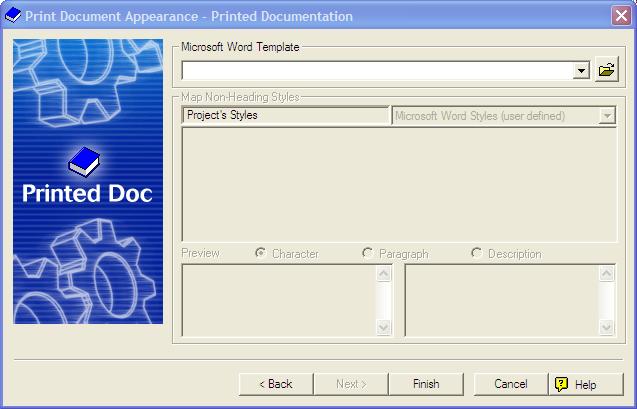
I can click Finish and I do get output which I can then format, but I would love to be able to select my preferred template rather than reformat it everytime.
Has this happened to anyone else, and if so, is there a fix?
Thanks,
Brenda


 7
Replies
7
7
Replies
7


Copy link to clipboard
Copied
You say you cannot select but do you mean from the dropdown or the folder icon does not work?
See www.grainge.org for RoboHelp and Authoring tips

Copy link to clipboard
Copied
Neither - the upper portion of the window is completely disabled and my mouse is an hourglass. I can only click on Back, Finish or Cancel. This happens everytime I attempt to create printed materials.
Copy link to clipboard
Copied
How much time do you allow before clicking Finish?
See www.grainge.org for RoboHelp and Authoring tips
Copy link to clipboard
Copied
Good question - so I tried again. On the Choose Source Document screen, I picked just one file as the source document (I'm not sure what would happen if I left them all selected). When I got to the Template screen, I ended up waiting at least 10 minutes before I gave up and clicked Finish.
Copy link to clipboard
Copied
Have you been able to print in the past or is the first attempt at printing?
See www.grainge.org for RoboHelp and Authoring tips
Copy link to clipboard
Copied
Thanks for your interest Peter. I am able to print; I just can't change the template. I created this project file about 5 years ago, and have been asked in the last few months to update it. I don't recall if I was ever able to select a template in the past, but I know I have not been able to since I've resumed the project this year.
This issue is not preventing me from creating printed materials; it's just frustrating that I have to reformat the output every time rather than have it use the template I designed.
Copy link to clipboard
Copied
You could try creating a copy of the project and then deleting the template it uses in the hope it then prompts you and allows you to choose a template.
Otherwise, I think the other option would be to try uninstalling and reinstalling RoboHelp but be aware it's not straightforward for RoboHelp 5. See Snippets on my site.
Certainly with RoboHelp HTML it is often the case that home brewed templates cause problems even though there is nothing technically wrong with them.
See www.grainge.org for RoboHelp and Authoring tips


 AdChoices