 Adobe Community

- Home
- RoboHelp
- Discussions
- When I publish to a SharePoint online folder, dupl...
- When I publish to a SharePoint online folder, dupl...
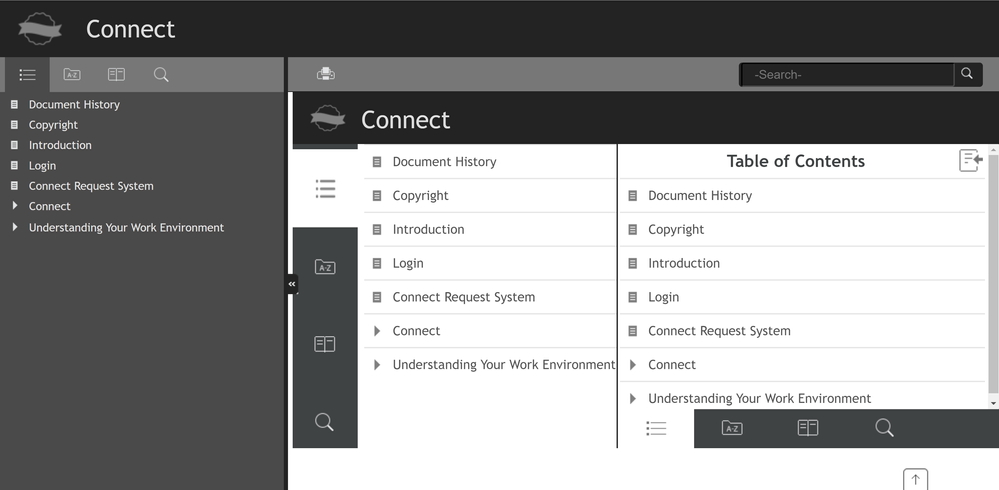
When I publish to a SharePoint online folder, duplicate TOCs display.

Copy link to clipboard
Copied
When I publish to a SharePoint online folder, duplicate TOCs display.


 7
Replies
7
7
Replies
7




Copy link to clipboard
Copied
What version of RH are you running? Classic or New UI (RH2019)? Are you all patched up? Check Help > Updates to check. If you generate to a local folder, does it appear correctly?

Copy link to clipboard
Copied
The thread says there is a reply but it's not showing.
There was a forum glitch and Jeff's reply is now showing. He asked the same question about your version.
Whenever you post, please give more information. What version of RoboHelp for a start. Which skin?
In this case is it OK before you publish to Sharepoint?
I've seen examples of two TOCs when someone sets their start page as the default topic but here you have three TOCs. One looks more like a TOC from a Word output.
Copy link to clipboard
Copied
HI Jeff,
I am running the latest version, RoboHelp 2019.0.14 with the most recent updates. (NOT RoboHelp Classic). This project was originally a RoboHelp Classic project that was upgraded. When I generate to a local folder the same issue happens, so I can't blame it on SharePoint. If I click another topic besides the Introduction topic (index,htm) it displays correctly.
Copy link to clipboard
Copied
Index.htm is the start page. It looks like you might be mixing that up with the default topic and that would explain the behaviour.
Make sure your start page is index.htm and your default topic is not the same. It should be the topic you want to see in the help when it first opens. Probably introduction.htm from what you have posted.
Copy link to clipboard
Copied
I made the changes to the default topic and do not have the Index topic display initially. However, if the Index topic is clicked, it still shows up multiple TOCs.
Copy link to clipboard
Copied
Do you have a topic in your source files with the name index.htm. You should not as RoboHelp creates that when generating.
It looks like you do have such a file and that it is causing this confusion.
Copy link to clipboard
Copied
This was fixed by clearing cache and reloading.


 AdChoices