


- Home
- RoboHelp
- Discussions
- Re: Importing Excel tables into RoboHelp
- Re: Importing Excel tables into RoboHelp
Importing Excel tables into RoboHelp

Copy link to clipboard
Copied
This procedure worked with RoboHelp 8.0.2, Microsoft Office 2003 and Windows XP. It should be OK for other versions and for OpenOffice but I can't test that here.
My developer proudly gave me a list of 200 error codes as an Excel table with four columns: Number, Description, Source, Possible Solution. Top-class stuff for a service manual, but it meant 800 rounds of Tab Ctrl-C Alt-Tab Tab Ctrl-V Alt-Tab. Being naturally lazy I decided to try an easier way.
In RoboHelp I created a simple table of 2 rows and 4 columns. I formatted the cells as Normal and looked at the HTML.
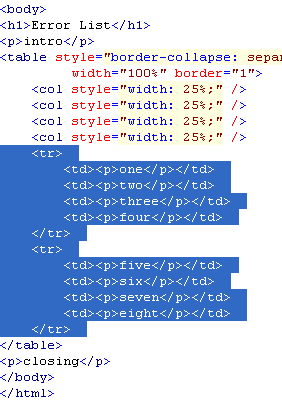
The Table Row <tr> and Cell <td> structure is easy to see; Each row begins with
<tr><td><p>
Between each cell is
</p></td><td><p>
Each row ends with
</p></td></tr>
First I `cleaned' my Excel sheet; I used Replace All to replace all commas with a string "COMMA". I also replaced ampersands "&" with the html "&" and then replaced greater-than ">" with ">" and less-than "<" with "<"
Then I inserted columns in the spreadsheet and filled them with the HTML table structure described above. I saved the Excel sheet as a comma-delimited file CSV.
I closed Excel and opened the CSV file with a text editor (Notepad).
I used Replace All to remove all commas (inserted by Excel); then restored the real commas by replacing the string COMMA.
Then I copied the entire contents of the file onto the clipboard, and pasted it into the HTML to replace my dummy rows.
That was it! RoboHelp accepted the transplant and I could format the header rows and set column widths in the normal way.
Dear RH and HTML gurus reading this: is my procedure safe? or will something come back to bite me later?
--- Derek


 3
Replies
3
3
Replies
3



Copy link to clipboard
Copied
I don't know if I'm a guru, but your procedure looks safe to me.
I can imagine that you'll get more Excel-sheets when the error codes change. Perhaps a nice developer can write a simple script to automatically transform you csv-files to a table. It seems it's quite a bit of work for you.
Greet,
Willam
This e-mail is personal. For our full disclaimer, please visit www.centric.eu/disclaimer.
Copy link to clipboard
Copied
A little update; I received a table, in Word, with newlines inside some cells. Copy-Paste from Word to Excel resulted in merged cells.
I used Find&Replace in Word to change "^p" into "NEWLINE". I could then Copy-Paste it into Excel.
Finally, in RoboHelp HTML view I used Find&Replace "NEWLINE" to </p><p>.
The rest of the procedure went fine, as described in my first post.
--- Derek

Copy link to clipboard
Copied
Our developer-provided tables are huge (up to 15 columns and 400 rows), so we've been able to have the developers create HTML files (not HTM) with similar formatting to our regular tables.
We then set up links to those files and add them to Baggage Files. They don't become part of the search (no problem for us, since we can include them into our Zoom Search indexing process), nor do they get processed by RoboHelp (which was a big plus because RH used to choke on those tables in HTM format).
The other plus is not having to repeat your process every time changes are made by the developers (they run their own conversion process and you plug in the replacement version of the file that they provide).
Good luck,
Leon


Get ready! An upgraded Adobe Community experience is coming in January.
Learn more
 AdChoices