 Adobe Community

- Home
- Stock Contributors
- Discussions
- immagine di copertina del portfolio
- immagine di copertina del portfolio
immagine di copertina del portfolio

Copy link to clipboard
Copied
Buongiorno, vorrei cambiare l'immagine di copretina del portfolio; come posso fare o dove posso cercare?


 8
Replies
8
8
Replies
8


Copy link to clipboard
Copied
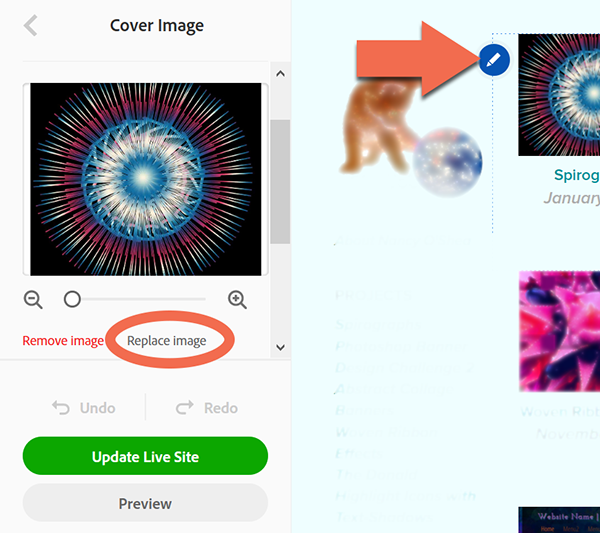
- Click the pencil icon.
- Select Edit Cover Image.
- In the left menu, select Replace Image. See screenshot.
- Choose another image from your hard drive.

Alt-Web Design & Publishing ~ Web : Print : Graphics : Media
Copy link to clipboard
Copied
Good evenong Nancy and mary Christmas.
Where can I find the pencil icon?
Copy link to clipboard
Copied
Merry Christmas to you, too. Did you notice the orange arrow in my screenshot?
Alt-Web Design & Publishing ~ Web : Print : Graphics : Media
Copy link to clipboard
Copied
Good evening. I'm sorry, but I didn't find the orange arrow.
also, i thought i had to start from my prtfolio in adobe stock.
thank you very much for your help.
Copy link to clipboard
Copied
Log-in to your Adobe Portfolio editing console at the link below.
Click on a cover image which will revieal a pencil icon for editing the cover image. See screenshot.
Alt-Web Design & Publishing ~ Web : Print : Graphics : Media
Copy link to clipboard
Copied

Copy link to clipboard
Copied
Well Nancy, I' would like to change the photo of the mountains.
as you suggested, I connected to the link that you kindly provided me, but I didn't understand anything, even talk about the website. I have not understood if I can create my own site within Adobe. I'm sorry, but I also find it difficult to understand if it refers to who sells or who buys images. greeting and thank you.

Copy link to clipboard
Copied
Hi vitomoto,
I believe you are speaking about your public profile cover. If that is what you speak of, do the following:
1) Go to your contributor portfolio page.
2) Click on the image you want to make your cover page.
3) Click on "Make profile cover image"
You should see your public profile cover image change within 24 hours of you selecting your new cover image.
Best wishes
JG

 AdChoices