Exit
  • Global community
    • Language:
      • Deutsch
      • English
      • Español
      • Français
      • Português
  • 日本語コミュニティ
  • 한국 커뮤니티
0

How to find an illustration in Stock and zooming in

New Here ,
Jul 21, 2020 Jul 21, 2020

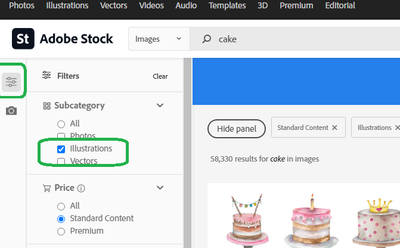
Hello. I am new to Stock and was trying to seach for an illustration. I clicked on "illustrations" in the upper left and was given a seach bar that said, "search all illustrations." I put in my key words and search and I get photos and illustrations. How can I limit the search to just illustrations? Also, is there a way to zoom in on images? I am coming from using Getty which gives nice big previews and allows you to zoom in on images.

TOPICS
Troubleshooting
381
Translate
Report
Community guidelines
Be kind and respectful, give credit to the original source of content, and search for duplicates before posting. Learn more
community guidelines

correct answers 1 Correct answer

Adobe Employee , Jul 22, 2020 Jul 22, 2020

Welcome to Stock, in Stock - we have image filters where you can refine your searches as below and in there you can specify illustrations: 
joon_Stock_0-1595436792966.png

And in image's detailed view (the view by clicking results thumbnail of any image) - there is "Preview Crop" menu where you can scale the view and aspect ratio as below:

joon_Stock_1-1595436945255.png

Please try them out, and let us know for further inquiries/questions.


Best regards,

Translate
Adobe Employee ,
Jul 22, 2020 Jul 22, 2020

Welcome to Stock, in Stock - we have image filters where you can refine your searches as below and in there you can specify illustrations: 

joon_Stock_0-1595436792966.png

And in image's detailed view (the view by clicking results thumbnail of any image) - there is "Preview Crop" menu where you can scale the view and aspect ratio as below:

joon_Stock_1-1595436945255.png

Please try them out, and let us know for further inquiries/questions.


Best regards,

Translate
Report
Community guidelines
Be kind and respectful, give credit to the original source of content, and search for duplicates before posting. Learn more
community guidelines
New Here ,
Jul 22, 2020 Jul 22, 2020
LATEST

Thank you! You have solved both my issues!

Translate
Report
Community guidelines
Be kind and respectful, give credit to the original source of content, and search for duplicates before posting. Learn more
community guidelines