順子大984646
Participant
December 20, 2019
Answered

イラレからWMFへの書き出し 不具合

  • December 20, 2019
  • 2 replies
  • 1607 views

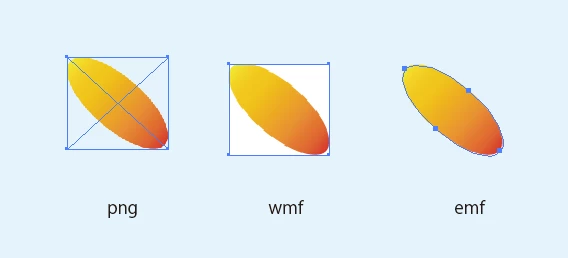
イラストレーターからWMFへの書き出したところ画像の後の背景が白になってしまいます。
イラレから直接、コピーしてPPTに貼り付けるた場合は背景が抜かれてきれいに表示されます。
WMFに書き出しても、きれいに背景がぬけるようにしたい。どなたかわかる方いらっしゃいますか?


イラレのVerは23.1 です。

    This topic has been closed for replies.
    Correct answer Ten A

    wmfファイルの場合ベクターデータに関する制限が存在するためベクターでの書き出しを行う場合はemfを利用します。また、ビットマップの書き出しが必要ならばpngを利用するべきでしょう。wmfでなければならない理由はありますか?

    2 replies

    Ten A
    Community Expert
    Ten ACommunity ExpertCorrect answer
    Community Expert
    December 24, 2019

    wmfファイルの場合ベクターデータに関する制限が存在するためベクターでの書き出しを行う場合はemfを利用します。また、ビットマップの書き出しが必要ならばpngを利用するべきでしょう。wmfでなければならない理由はありますか?

    順子大984646
    Participant
    December 24, 2019

    emf形式は比較的新しいので、office系での動作の確認をまだしていないのですが、検証を進めて切り替えた方が良さそうですね。 ありがとうございました。


    Srishti_Bali
    Legend
    December 21, 2019

    Hi there,


    Thanks for reaching out. If I get it correctly, when you copy-paste an object from Illustrator, it gets pasted without background but when you paste it after exporting to WMF it gets pasted with a background. I tried but couldn't replicate this issue at my end.


    They both look same at my end. I would request that if you can share a few more details like:

    • Operating system you are working on.
    • Step by step workflow you are following.
    • Screenshot of how it looks at your end.
    • Is the issue related to a specific document(s)/asset(s)? If yes, could you please share the document(s)/asset(s) with us? You can upload it to the creative cloud and share the download link. 


    Regards,

    Srishti

    順子大984646
    Participant
    December 23, 2019

    ありがとうございます。

    win10を使用しています。

    パスを切ってグラデーションを付けているだけです。特別なことはしていません。

    リンク


    Srishti_Bali
    Legend
    December 27, 2019

    Thanks so much for explaining this. I can replicate this issue at my end. I will check for the WMF files with our Product team. Till the time it is fixed, please continue using PNGs or EMF format as suggested by Ten A


    Regards!