
SAKU1226
Participating Frequently
February 3, 2017
Answered

イラレの立ち上げるファイルによって拡大方法が異なる

  • February 3, 2017
  • 1 reply
  • 715 views

Win10でIllustratorCC2017を使用しています。

イラレのショートカットから立ち上げた時はCtrl+スペースでの拡大の際、Photoshop同様クリック&左右ドラッグでズーム、ズームアウトができるのですが、

デスクトップに保存してあるファイルを立ち上げると、ズーム方法が従来の拡大範囲を囲って拡大する方法になってしまいます。

ファイルを開いた際にもPhotoshopと同じ拡大方法にすることはできないのでしょうか?

回答お待ちしております。

メッセージ編集者: SAKU1226
This topic has been closed for replies.
Correct answer barbara_a7746676

Usually it is the same as Photoshop.

But sometimes, it will change to past expansion methods.

This is a method of enlarging by enclosing the enlarged area with a square.

I always want to use it the same way as Photoshop.


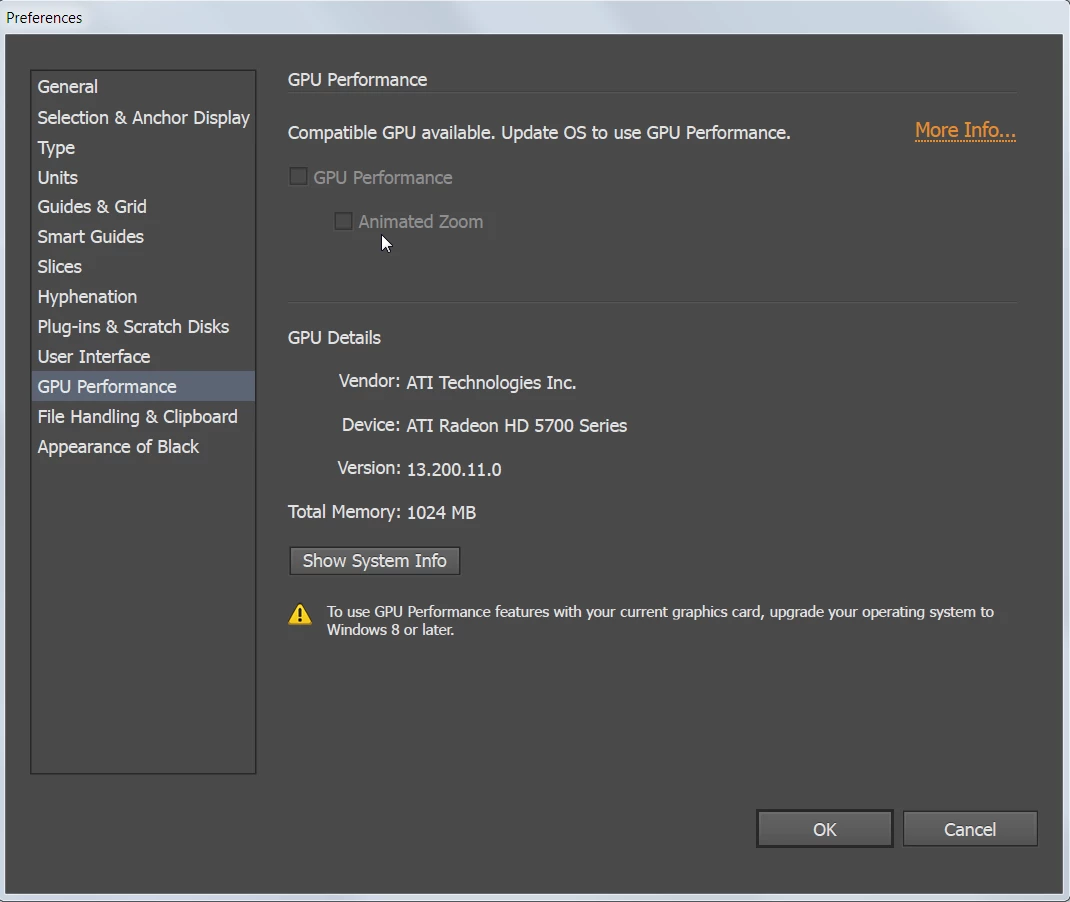
In the GPU Preference settings, take the check mark off of "Animated Zoom,"

1 reply

barbara_a7746676
Community Expert
Community Expert
February 3, 2017

Your post did not translate well to English, so it is difficult to understand the question. Are you trying to find multiple methods for zooming in Photoshop?

SAKU1226
SAKU1226Author
Participating Frequently
February 3, 2017

Illustrator zoom method will be changed.

When Illustrator is started, if you start an Illustrator file with a zoom method like Photoshop, it becomes a conventional Illustrator zoom method.

I would like to use both zoom methods like Photoshop.

Because you are using translation software, English may be wrong. Excuse me.

barbara_a7746676
Community Expert
Community Expert
February 3, 2017

The zooming methods in Photoshop and Illustrator are identical. Perhaps I'm still not understanding.