



Participant
February 25, 2024
Answered

ピクセルにスナップの描画で自動的にラスタライズ後にしたい

  • February 25, 2024
  • 4 replies
  • 409 views

設定は表示/ピクセルにスナップ、表示/ピクセルプレビューを有効化した状態で描画しています。円などのクラウドがあるオブジェクトを、自動的にラスタライズした後のような描画にしたいのですが方法はありますか?よろしくお願いします。

This topic has been closed for replies.
Correct answer Ten A

クラウドっていうのはアンチエイリアスで生じた薄い部分のことですかね?
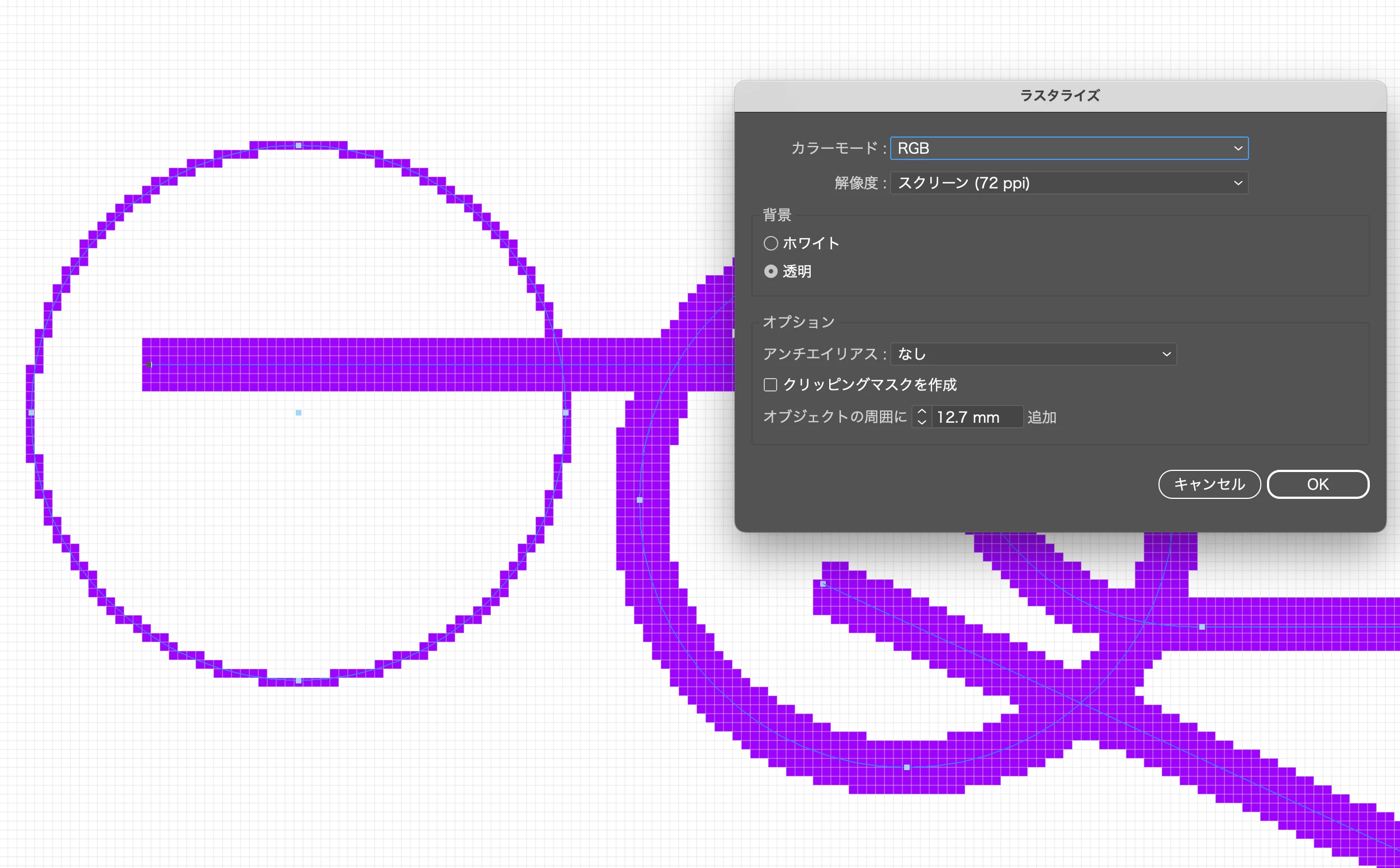
ピクセルスナップをオンにしても形状の再現性を保持するためにアンチエイリアスは生きてきます。このアンチエイリアスをころすにはTon Frederiksさんの指摘の通りラスタライズ効果を利用します。オプションのアンチエイリアスをなしに設定すると意図した状態になるでしょう。
個々にアピアランスを適用することが難しい場合は完成データをグループ化したうえで適用するとよいでしょう。
4 replies

Participant
February 27, 2024

質問に答えてくれた方々ありがとうございます

Ton Frederiks
Community Expert
Community Expert
February 27, 2024

Good to hear that helped.

Ten A
Community Expert
Ten ACommunity ExpertCorrect answer
Community Expert
February 26, 2024

クラウドっていうのはアンチエイリアスで生じた薄い部分のことですかね?
ピクセルスナップをオンにしても形状の再現性を保持するためにアンチエイリアスは生きてきます。このアンチエイリアスをころすにはTon Frederiksさんの指摘の通りラスタライズ効果を利用します。オプションのアンチエイリアスをなしに設定すると意図した状態になるでしょう。
個々にアピアランスを適用することが難しい場合は完成データをグループ化したうえで適用するとよいでしょう。

Ton Frederiks
Community Expert
Community Expert
February 25, 2024

Moved to the Japanese Illustrator forum.

Ton Frederiks
Community Expert
Community Expert
February 25, 2024

The Rasterize Effect can be helpful, it will let you preview in Illustrator how artwork will look in Photoshop when copied and pasted. Because it is an effect you can always change the artwork and even turn it off.

You can make a graphic style to add the effect to existing artwork.