


Participating Frequently
October 8, 2019
Answered

illustratorパスのハンドルを左右対称に動かす方法

  • October 8, 2019
  • 1 reply
  • 6895 views

パスのハンドルを左右対称にひいて、左右が同じ形になるようにするにはどうしたらいいでしょうか。


    This topic has been closed for replies.
    Correct answer Bill Silbert

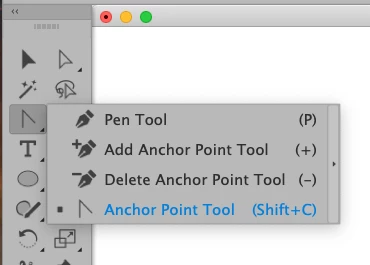
    Select the anchor point using the direct selection tool (white arrow) and then click and pull on that anchor point using the anchor point tool (found under the Pen Tool—see screen shot).

    1 reply

    Bill Silbert
    Community Expert
    Bill SilbertCommunity ExpertCorrect answer
    Community Expert
    October 8, 2019

    Select the anchor point using the direct selection tool (white arrow) and then click and pull on that anchor point using the anchor point tool (found under the Pen Tool—see screen shot).

    ofkAuthor
    Participating Frequently
    October 8, 2019
    Thank you!!