


Participant
June 20, 2020
Answered

illustrator2020が起動しません

  • June 20, 2020
  • 4 replies
  • 1234 views

環境:Macbook pro2017 macOS Catalina バージョン10.15.5


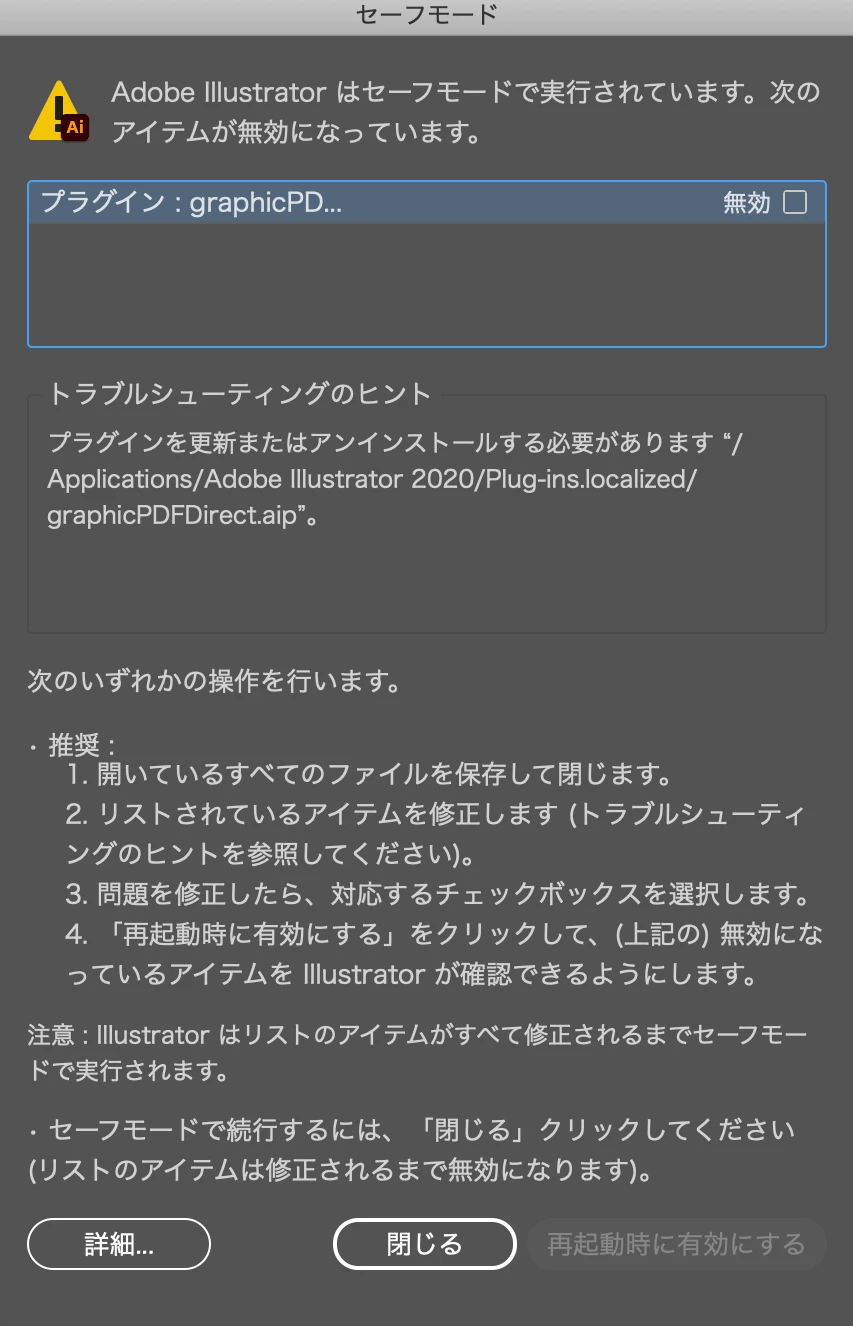
illustratorを起動すると強制終了しセーフモードが実行されます。

プラグインが無効になっているとことで、トラブルシューティングhttps://helpx.adobe.com/jp/illustrator/using/safe-mode-illustrator-diagnostic-startup-tests.htmlを見ながらアイテムの修正を行おうとしましたが更新のやり方がわかりません。

更新かアンインストールどちらが必要なのかもわからず困っております。

手順を教えていただきたいです。

よろしくお願いいたします。

This topic has been closed for replies.
Correct answer Ten A

silk-mさんの指摘が正しいのですが、少々バックグラウンドを追加しておきます。
Illustratorのプラグインアーキテクチャはver.24でpipl周りに変更が加えられました。この影響で、当該プラグインに限らずサードパーティ製のver.23以前のバージョン用にリリースされていたものは.ver.24以降との間で互換性が失われています。

4 replies

Ten A
Community Expert
Ten ACommunity ExpertCorrect answer
Community Expert
June 22, 2020

silk-mさんの指摘が正しいのですが、少々バックグラウンドを追加しておきます。
Illustratorのプラグインアーキテクチャはver.24でpipl周りに変更が加えられました。この影響で、当該プラグインに限らずサードパーティ製のver.23以前のバージョン用にリリースされていたものは.ver.24以降との間で互換性が失われています。

pipicaAuthor
Participant
June 25, 2020

ありがとうございます!解決いたしました。

assause
Community Expert
Community Expert
June 20, 2020

Illustrator Community (us) から Illustratorフォーラム (jp) に移動しました。

silk-m
Community Expert
Community Expert
June 20, 2020

そこに書かれている通りです。「GraphicPDFDirect.aip」がトラブルの原因になっている様ですから、「GraphicPDFDirect.aip」が必要なら対応するバージョンに更新します、必要なければアンインストールしてください。

または「印刷の通販グラフィック」に相談してください。

--Susumu Iwasaki
pipicaAuthor
Participant
June 25, 2020

ありがとうございます!解決いたしました。


Monika Gause
Community Expert
Community Expert
June 20, 2020

Which version is it? The new 24.2 that you just installed?

Did you turn off antivirus before installing?


BTW: There is a Japanese community if you'd prefer to have discussions in Japanese only: https://community.adobe.com/t5/illustrator%E3%83%95%E3%82%A9%E3%83%BC%E3%83%A9%E3%83%A0/bd-p/illustrator-jp?page=1&sort=latest_replies&filter=all