


Participant
December 14, 2019
Answered

Myriad Pro

  • December 14, 2019
  • 1 reply
  • 627 views

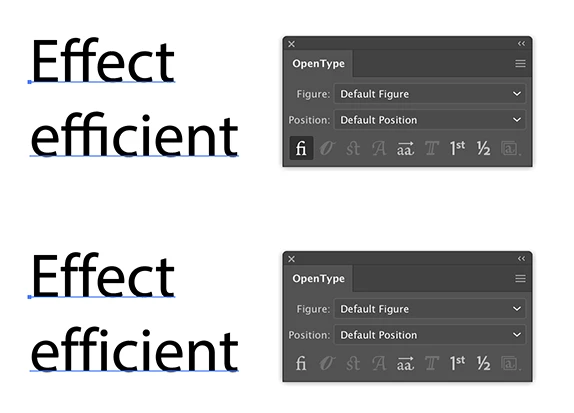
Photoshop Illustrator 2019 or 2020で起きる現象なのですが、テキスト入力時にこのフォントで“Effect”のように、小文字のfを2つ重ねると、マウスクリックでfとfとの間を選択できません。矢印キーでの移動は可能ですが、移動してもカーニングが一切効きません。他の文字やフォントでは起きないのですが、同様の症状の方いらっしゃいますでしょうか?


[Moving from generic Start/Help forum to the specific Program forum... Mod]
[To find a forum for your program please start at https://community.adobe.com/]

This topic has been closed for replies.
Correct answer Ton Frederiks

These are Ligatures, special characters that combine several characters into a new more pleasing one.

See the OpenType panel.

1 reply

Ton Frederiks
Community Expert
Ton FrederiksCommunity ExpertCorrect answer
Community Expert
December 14, 2019

These are Ligatures, special characters that combine several characters into a new more pleasing one.

See the OpenType panel.

Participant
December 14, 2019

Mr. Ton. Thank you very much for your reply and. it solves the priblem.

Now I realize this is a function.

Ton Frederiks
Community Expert
Community Expert
December 14, 2019

Good to hear that helped you.