
Participant
December 19, 2018
解決済み

プリントモジュールで写真を拡大する方法

  • December 19, 2018
  • 返信数 1.
  • 213 ビュー

最近Lightroomを利用し始めた初心者です。

プリントモジュールのカスタムパッケージを利用してコラージュを作ろうとしています。

画像セルを小さめにして写真に写る一部分を拡大して表示したいのですが、セルを小さくすると全体的に写真も縮小されてしまい、一部分を拡大することができません。

以下ヘルプを見ても位置移動はできますが拡大縮小は言及されておりません。

Lightroom Classic CC のプリントモジュールのレイアウトとテンプレート

例えば花畑の写真の真ん中に写っている花だけを表示したい感じなのですが、やり方はあるでしょうか?

写真コピーなどからクロップして画像セルに追加という手間をかけないといけないのかご教示ください。
    このトピックへの返信は締め切られました。
    解決に役立った回答 Rob_Cullen

    to see only the flowers are visible in the middle of the flower fields photo?

    If my translation is correct-

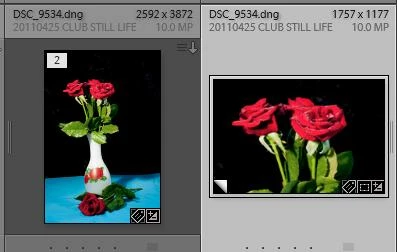
    Best way will be to make a Virtual Copy.

    Crop the Virtual copy to the format you want.

    Use the Virtual Copy in the Custom print.

    返信数 1

    Rob_Cullen
    Community Expert
    Rob_CullenCommunity Expert解決!
    Community Expert
    December 19, 2018

    to see only the flowers are visible in the middle of the flower fields photo?

    If my translation is correct-

    Best way will be to make a Virtual Copy.

    Crop the Virtual copy to the format you want.

    Use the Virtual Copy in the Custom print.

    Regards. My System: Windows-11, Lightroom-Classic 15.1.1, Photoshop 27.3.1, ACR 18.1.1, Lightroom 9.0, Lr-iOS 10.4.0, Bridge 16.0.2 .