Participant
Aug 18, 2024 5:12 PM UTC
Answered

ディスプレイのカラーマネジメントが出てこない

設定、一般でディスプレイのカラーマネジメント(GPUアクセラレーションが必要)が出てこないため、チェックをつけれません。対処方法を教えてください。

    This topic is closed to new replies. Start a new post to keep the conversation going.
    Ckun
    CkunCorrect answer
    Community Expert
    Aug 18, 2024 11:39 PM UTC

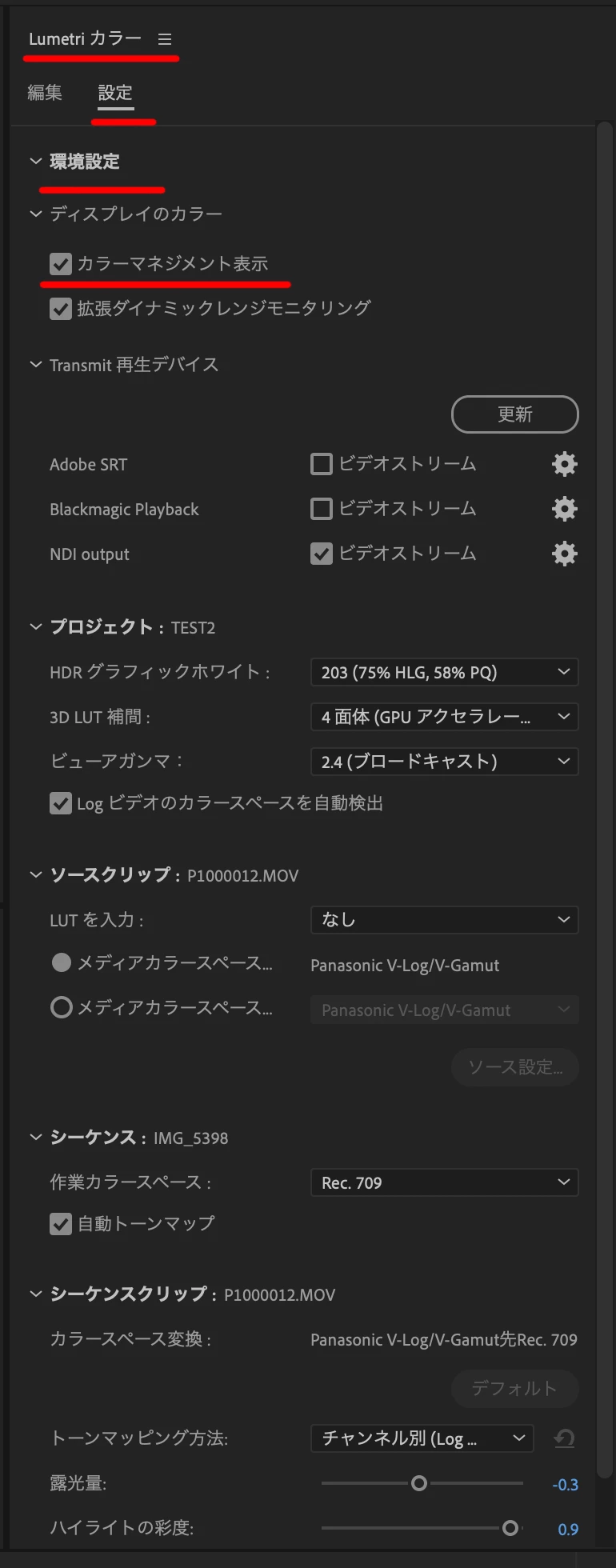
    ディスプレイのカラーマネージメントの設定は、「Lumetri カラー」パネルの「設定」のタブに移動されました。

    Premiere Pro のカラーマネジメント 


    ※この変更は、2023年10月リリース版(24.0)で行われました。

    Premiere Pro 機能の概要(2023年10月リリース) 

    2 replies

    Ckun
    Community Expert
    CkunCommunity ExpertCorrect answer
    Community Expert
    Aug 18, 2024 11:39 PM UTC

    ディスプレイのカラーマネージメントの設定は、「Lumetri カラー」パネルの「設定」のタブに移動されました。

    Premiere Pro のカラーマネジメント 


    ※この変更は、2023年10月リリース版(24.0)で行われました。

    Premiere Pro 機能の概要(2023年10月リリース) 

    Translate
    Participant
    Aug 19, 2024 12:28 PM UTC

    ありがとうございます!できました!

    助かりました!

    Translate