Known Participant
September 17, 2019
Answered

プレミアのタイムラインパネル

  • September 17, 2019
  • 2 replies
  • 798 views

premier proのタイムラインパネル内の下にあるスライダーで拡大縮小ができますよが、そのキーボードショートカットコマンドを教えて下さい。ちなみに私はテンキーのないキーボードを使用しています。

This topic has been closed for replies.
Correct answer 150kw

お早うございます、Ryo_Tajimaさん


Windows 10+Premiere Pro CC2019(v13.1.4)の場合です。


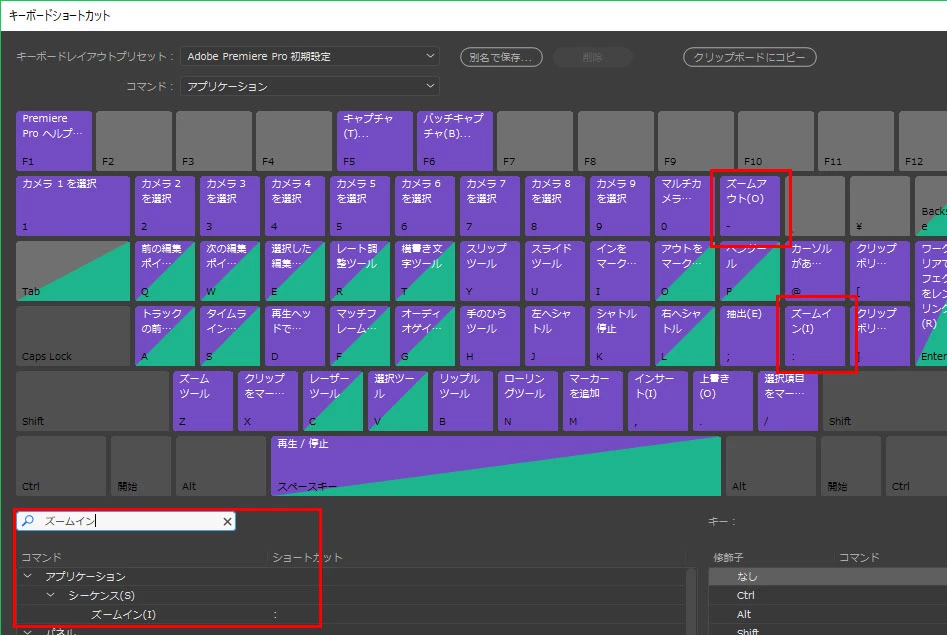
シーケンスのズームイン   :(コロン)

シーケンスのズームアウト  - (ハイフン)

日本語入力 オフ で行います。


下図を参考にしてください。
 

2 replies

MyerPj
Community Expert
Community Expert
September 17, 2019

Using the Keyboard Shortcut features, here's what the ones you want look like in English.


Known Participant
September 17, 2019

ありがとうございます。こちらからショートカット検索できることを知りました!今度からこちらで検索して調べてみようと思います。質問のほうも無事に解決いたしました。ありがとうございました。

MyerPj
Community Expert
Community Expert
September 17, 2019

+ and - keys

Also "\" shows the whole timeline, press again and it goes back to where you were.

Known Participant
September 17, 2019

ありがとうございます。しかし私のキーボードが日本語入力のキーボードのせいかショートカットできませんでした。

150kw
Community Expert
150kwCommunity ExpertCorrect answer
Community Expert
September 17, 2019

お早うございます、Ryo_Tajimaさん


Windows 10+Premiere Pro CC2019(v13.1.4)の場合です。


シーケンスのズームイン   :(コロン)

シーケンスのズームアウト  - (ハイフン)

日本語入力 オフ で行います。


下図を参考にしてください。