


日本語文字入力時、Microsoft IME のキー設定、ATOK に対応していない
When inputting Japanese characters, Microsoft IME key setting and ATOK are not supported. I don't use JustSystems IME software ATOK, but his ATOK for Microsoft IME key settings.
This is an input method in which you use ← → to change the segment delimiter, use a space to convert, and then press ↓ to confirm the conversion of the segment.
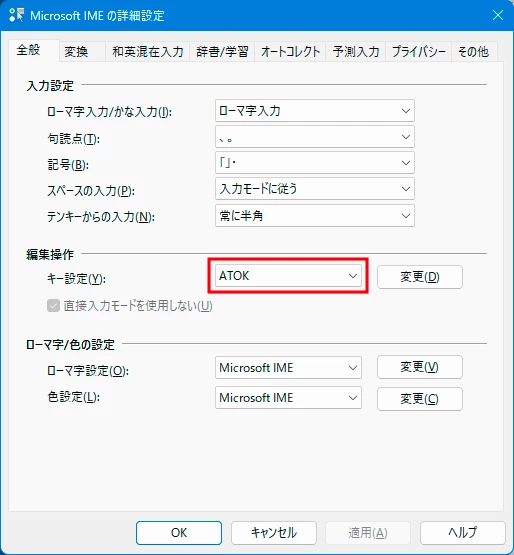
To set the IME function, right-click the input display area on the right side of the taskbar, Properties > Advanced settings > General tab > Edit operation > Key settings > Select ATOK from the pull-down menu
Since Photoshop supports ATOK key setting, please support Premiere by all means.
Premiere 23.2.0 (build 69)
Photoshop 24.2.0
Windows11
日本語文字入力時、Microsoft IME のキー設定、ATOK に対応していません。JustSystems の IMEソフトのATOK を使用しているのではなく、Microsoft IME の キー設定 の ATOK です。
← → で文節の区切りを変更し、スペースで変換し、↓で文節の変換を確定する入力方法です。
IME機能の設定は、タスクバー右にある入力表示部分を右クリック、プロパティ>詳細設定>全般タブ>編集操作>キー設定>プルダウンメニューから ATOK を選択
PhotoshopはATOKキー設定に対応しているので、Premiereもぜひ、対応をお願いします。
Premiere23.2.0(ビルド 69)
Photoshop24.2.0
Windows11
 AdChoices