Known Participant
January 17, 2020
Answered

簡単な方法で動画を分割させたい
  • January 17, 2020
  • 3 replies
  • 906 views

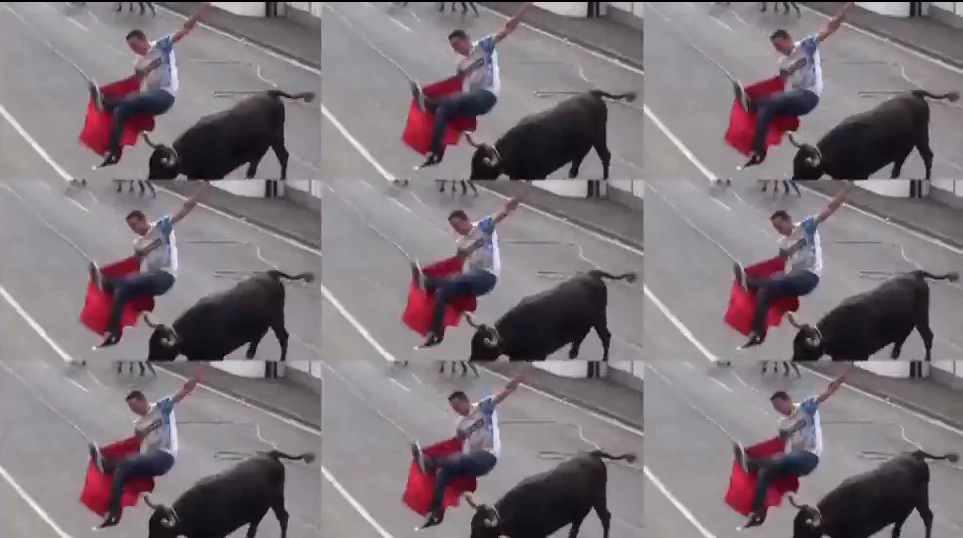
画像のように動画を分割させたいのですが、これは1つ1つクロップなどでカットして合わせているのでしょうか?エフェクトなどを入れて簡単に分割する方法はないのでしょうか?

I want to know how to split a video easily.

    This topic has been closed for replies.
    Correct answer 150kw

    おはようございます


    「エフェクト」パネルの「ビデオエフェクト」→「スタイライズ」 フォルダーにある「複製」エフェクトを適用してみてください。


    下記リンクをご参考にしてみてください。

    https://helpx.adobe.com/jp/premiere-pro/using/video-effects-transitions.html 

    3 replies

    150kw
    Community Expert
    150kwCommunity ExpertCorrect answer
    Community Expert
    January 17, 2020

    おはようございます


    「エフェクト」パネルの「ビデオエフェクト」→「スタイライズ」 フォルダーにある「複製」エフェクトを適用してみてください。


    下記リンクをご参考にしてみてください。

    https://helpx.adobe.com/jp/premiere-pro/using/video-effects-transitions.html 

    Richard TOULON
    Legend
    January 17, 2020

    Choose the Replicate Fx in your Effect Panel.

    Legend
    January 17, 2020

    Not sure I understand.  Do you want to shrink a clip and repeat it in the frame?  You might find a prefab effect in something like fxfactory . https://fxfactory.com/

    But it shouldn't be too difficult to build this yourself.  Just edit the clip in the timeline, go to the effects controls and scale and position as desired for the top left.  Duplicate this clip in the timeline directly above the clip and adjust the vertical position for the left center.  Than repeat and adjust the vertical position for the left bottom.  Then duplicate the 3 clips, and place above the existing three and adjust the horizontal position of the three new clips so they sit in the center of the frame.  And then repeat so the new duplicates sit on the right side of the frame.  Make sense?