Answered
This topic is closed to new replies. Start a new post to keep the conversation going.
こんばんは、kjr666さん
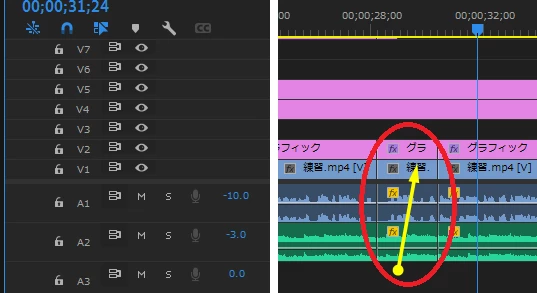
>この時V1A1A2のクリップをまとめて選択する方法
下図黄矢印のように、V1A1A2のクリップにかかるようにドラッグします。ドラッグはクリップ外から始めます。

スローモーションにすると、クリップのデュレーションが伸びますので、後続のクリップを上書きしてしまいます。
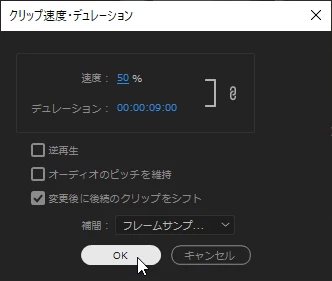
これを防止するには、「クリップ速度・デュレーション」ウィンドウで、「変更後に後続のクリップをシフト」にチェックを入れます。
また、音程を維持するには、「オーディオのピッチを維持」にチェックを入れます。

Sign up
Already have an account? Login
To post, reply, or follow discussions, please sign in with your Adobe ID.
Sign inSign in to Adobe Community
No account yet? Create an account
To post, reply, or follow discussions, please sign in with your Adobe ID.
Sign inEnter your E-mail address. We'll send you an e-mail with instructions to reset your password.