


Participant
April 25, 2019
Answered

Acrobat 2017 로그인 화면 반복

  • April 25, 2019
  • 1 reply
  • 1922 views

Acrobat 2017 설치파일을 다운로드 받고 시리얼번호 입력해서 설치까지 다 받았습니다.

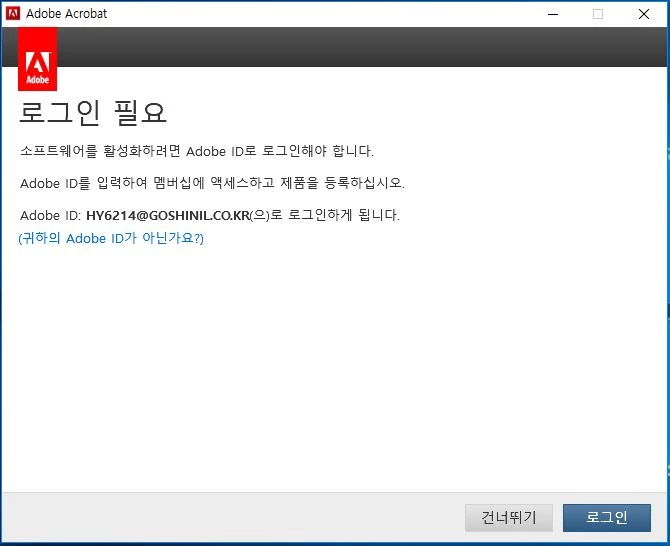
설치된 Acrobat 2017을 실행 후,, 아래 와 같은 로그인 창에서 로그인을 하면 로그인이 되지 않고 계속하여 로그인 화면이 반복적으로 보이고 있어 사용을 못하고 있습니다.

삭제 후 재설치도 해보았고, 아래 링크 접속해서 Adobe 활성화 서버 연결도 테스트하였는데, 아무 문제 없었습니다.

https://helpx.adobe.com/kr/x-productkb/policy-pricing/activation-network-issues.html#reset-hosts-file

사용자 정보 초기화를 해도 로그인이 안되는데, 어떻게 해야 로그인을 할 수 있나요?

<반복되는 로그인 창>
This topic has been closed for replies.
Correct answer AnandSri

Hello there,

We're sorry for the trouble and for the delayed response, please try the solution shared in the following help article and let us know if you experience any issue User prompted to sign in repeatedly

Thanks,

Anand Sri.

1 reply

AnandSri
Community Manager
AnandSriCommunity ManagerCorrect answer
Community Manager
July 8, 2019

Hello there,

We're sorry for the trouble and for the delayed response, please try the solution shared in the following help article and let us know if you experience any issue User prompted to sign in repeatedly

Thanks,

Anand Sri.
