

Cannot Open New PDF Files While Adobe Acrobat Is Running
Title: [Bug Report] Acrobat Pro on MacBook M4 Cannot Open Additional PDF Files While Already Running (False Permission Error)
Hello,
I would like to report what appears to be a reproducible bug in Adobe Acrobat Pro on my MacBook M4.
■ Environment
-
Device: MacBook M4
-
OS: macOS Sequoia 15.6
-
Product: Adobe Acrobat Pro (Subscription Version)
-
Installation: Acrobat was installed on a brand-new Mac. No data or settings were migrated from a previous Mac or Windows PC using Migration Assistant.
■ Issue Description
If Adobe Acrobat is completely closed, I can open PDF files normally.
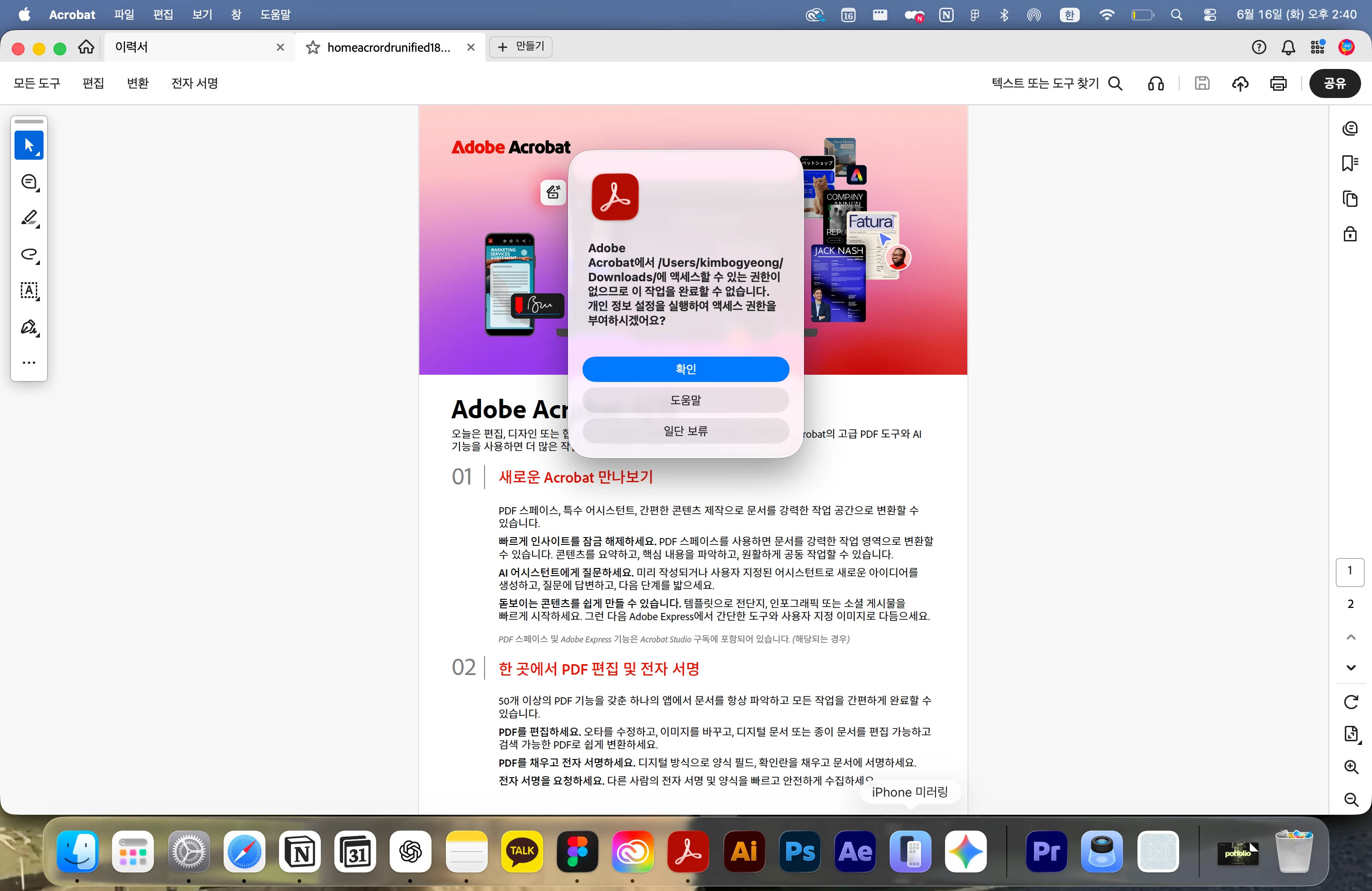
However, once Adobe Acrobat is already running, I cannot open any additional PDF files. Instead, Acrobat displays a permission error and refuses to open the file.
Example message:
"Adobe Acrobat does not have permission to access '/Users/[username]/Downloads/' or '/Users/[username]/Desktop/'. Would you like to open Privacy Settings to grant access?"
■ Steps to Reproduce (100% Reproducible)
-
Completely quit Adobe Acrobat.
-
Double-click PDF file A in Finder.
-
PDF file A opens normally.
-
While Acrobat is still running, try to open PDF file B.
-
The same permission error occurs in all of the following situations:
-
Double-clicking another PDF file in Finder
-
File → Open inside Acrobat
-
Open Recent inside Acrobat
In every case, Acrobat displays the permission error and cannot open the additional PDF file.
■ Why This Does Not Appear to Be a Normal macOS Permission Issue
-
PDF files open normally when Acrobat is not already running.
-
The first PDF file from the same Desktop or Downloads folder can be opened without any issue.
-
If this were a genuine permission problem, even the first PDF file should fail to open.
-
Acrobat is already displaying a PDF from the Downloads or Desktop folder, yet it simultaneously reports that it does not have permission to access that same folder.
Because of this behavior, the issue appears to be related to how Acrobat handles file access permissions when opening additional PDF files while the application is already running, rather than an actual macOS permission denial.
■ Troubleshooting Already Attempted
-
Granted Full Disk Access to Adobe Acrobat under System Settings → Privacy & Security → Full Disk Access.
-
Enabled Desktop Folder and Downloads Folder permissions under System Settings → Privacy & Security → Files and Folders.
-
Disabled and re-enabled Full Disk Access after restarting the Mac.
-
Restarted the Mac multiple times.
-
Uninstalled and reinstalled Adobe Acrobat.
-
Tested PDF files stored in different locations, including Desktop and Downloads.
-
Renamed files and folders using English names only.
-
Confirmed that the Mac was set up as a new device without using Migration Assistant.
-
Verified that the same issue occurs when opening files via Finder, File → Open, and Open Recent while Acrobat is already running.
None of the above steps resolved the issue.
■ Request
-
Please confirm whether this is a known issue on macOS Sequoia with Apple Silicon (M4) Macs.
-
Please escalate this issue to the Acrobat engineering team for investigation.
-
Please advise how to collect diagnostic logs and whether there are any additional debugging steps that can be performed.
At this point, the issue appears to be a reproducible bug in which Acrobat incorrectly handles file permissions when opening additional PDF files while already running, rather than a simple macOS permission configuration issue.
Thank you for your assistance.
 AdChoices