Answered

This topic is closed to new replies. Start a new post to keep the conversation going.
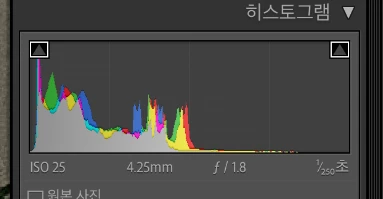
보내주신 스크린샷에 답이 나와있습니다.
노출도를 확인 할 수 있는 히스토그램이 활성화 되어 있다면 파란 계열 또는 붉은 계열의 노출도를 확인 할 수 있습니다.
비활성화 하시면 됩니다.
감사합니다.


Sign up
Already have an account? Login
To post, reply, or follow discussions, please sign in with your Adobe ID.
Sign inSign in to Adobe Community
To post, reply, or follow discussions, please sign in with your Adobe ID.
Sign inEnter your E-mail address. We'll send you an e-mail with instructions to reset your password.
 AdChoices