







The official community for Adobe Color.
Recently active
Hi everybody!I've been having these issues with the https://color.adobe.com/ website for a long time now:-The "libraries" tab show "You don't own any color themes and gradients" when I indeed to have a lot.-The "trends" tab doesn't loads and shows the loading wheel forever.-My profile pic appears empty. I already tried cleaning the caché, signing out and then signing in again but nothing works.I reported this to Adobe last year, they said that they could try to see what was wrong with the site if I got a subscription and that it was mostly related to that which I think, in my honest opinion, it doesn't.No matter how many times I said things like "I have no subscription, I've never had one." "I literally just use to site to create and save color palettes." "This is not related to any app." "This is indeed an Adobe site, it's on the URL" it seems that not only they couldn't comprehend what I was talking about but that they didn't know Adobe Colors existed in the first
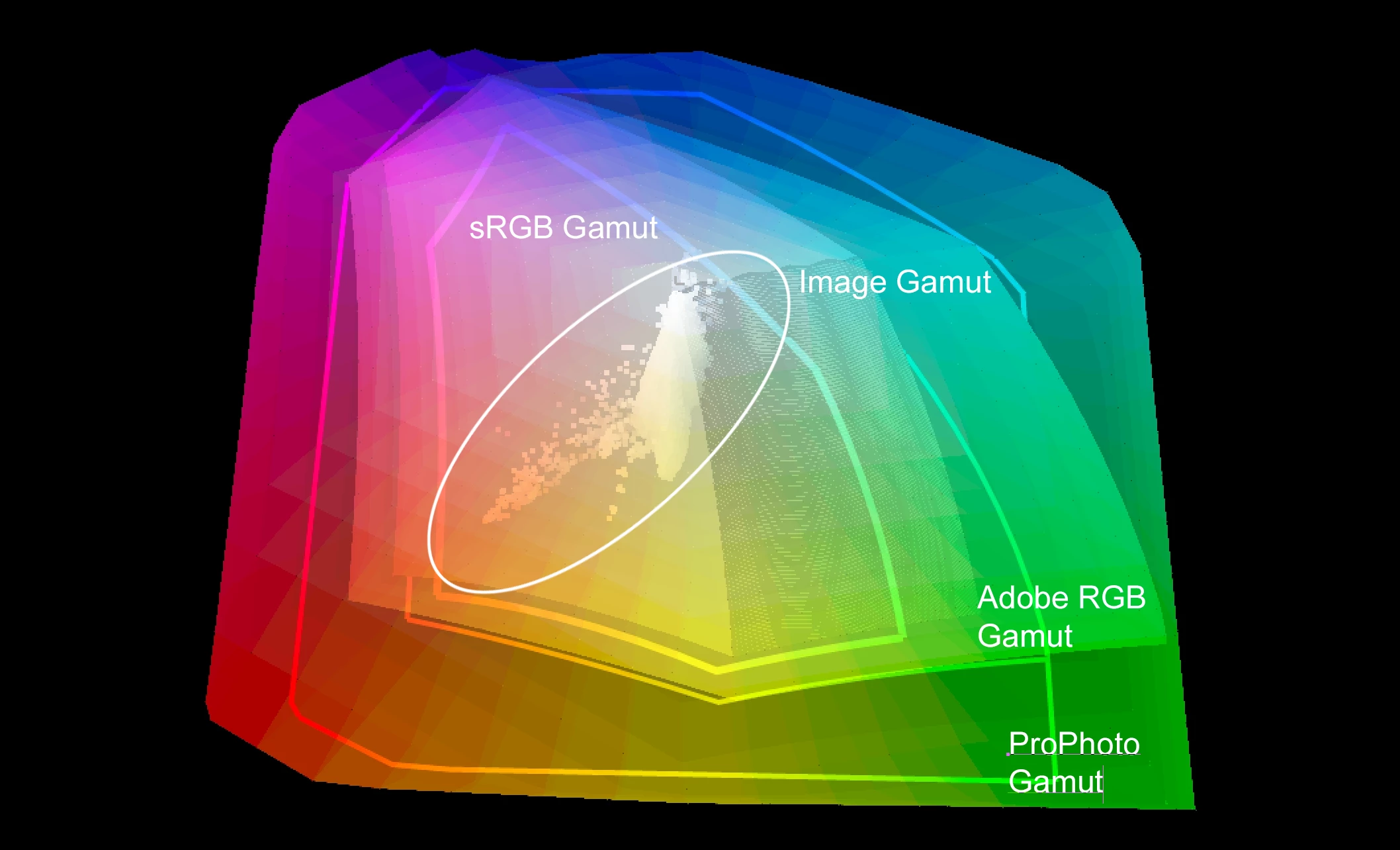
When I find a color I like in the Adobe Color Wheel (https://color.adobe.com/create/color-wheel), I like to pull it over into PS as a solid fill layer for color grading. However, I notice a sometimes significant shift in the color. I know the internet is in sRGB and my image in PS is in ProPhoto. What color space does the adobe color wheel refer to? Or why do I see a sometimes significant shift in the color? Or maybe I'm just doing something wrong. I use the eyedropper on the adobe webpage, find a color I like from my image and then create a color scheme from that image. Then, I copy the new colors I like into solid fill layers for color grading.
what is the code in adobe color wheel for canvas color #2C1E4A?
desde un tiempo para aca noto que desaparecio la opcion de usar adobe color directamente en photoshop o illustrator, casi no la usaba pero si que ahorraba tiempo , ya no se puede conseguir o por lo menos no la encuentro, aun se puede usar en estas aplicaciones ?
how can I transfer color themes from general library into newly created library?
como agrego un 6 color a la rueda de colores
hey how i can dawonlod adobe color themes
Hello.I'm using Photoshop CC2024I'm asking you a question because there seems to be a problem with the color scale.If you look at attachment 01, when you open a new file, white comes out as blue-ish. I feel like the red value is slightly missing from rgb. It feels that blue even when I open another image file. In the past, I changed the setting to use ACEScg and set the monitor to p3d-65 and then back to srgb, but it seems to be like this after that. Attached file 02 is my Photoshop color setting. My monitor is dell u2723qe. If you set the profile as in attachment 03, normal white comes out in rgb color mode, but if you look at each channel, you can still see blue. The same is true when I open it in gray color mode. Is there a problem with the color profile of the monitor and the setting of Photoshop? For your information, there is no problem with Photoshopcs6. The color setting is the same. I look forward to your response.Goodbye.
The "most used" filter within the "color theme" doesn't work, and it's been like that for few days already.
I've been trying to try out the new Adobe Color lab. It's supposed to allow you to recolor SVG files. All I get is a spinning wheel while it's processing. Nothing else happens.
I cannot physically expand the distance of the color selection pointers in Adobe Color wheel. What to do?
Hi there, I love the fact we can now add extra swatches to our Adobe Color palettes, but I don't understand the rules behind what clicking on the 'add a swatch' button uses.It adds a different colour depending on which swatch I click the plus button next to, but there's no explanation on how it decides what colour to add.
Hi everybody.Is there any chance to import and view an Adobe Color palette in Lightroom Classic to use it working on a color grading on my images?Many thanks.
Something has gone wrong since my assistant used photoshop. When i go to the picker I get a gradient type messed up display of colors. See attach I have searched and tried all of the fixes for color picker, selecting H or any of the other selections does not display the picker corectly. Thanks
Adobe colors
As M Winther posted (below) on May 17, 2016. Color rules that existed in Kuler are missing in Adobe Color. Adobe Color is pretty useless to me without the split complementary rule. Please add split complementary and the two tetrads back in to the program.Thanks,Tim"These colour rules are missing in the Adobe Color CC colour rules (here) : split complementary and the two types of tetrads (rectangle and square). (See Color Harmonies.) Especially split complementary is important. So I wish that these were added as alternatives in the colour rules. /Mats"
It is possible to add more colors to the palette, for example instead of having 5, having 7 or 8
Hi, Dose anyone know of a good plug-in or app that helps with checking colour accessibility please? Cheers!
Bom dia, como faz para ter acesso a Extensão do Adobe color dentro do After Effects ?
When I enter a TSL value or an RVB value for a color on the Adobe Color Application Wheel; it does not provide me the same color as I see on Photoshop with the Color Picker. So the same values but not the same display the same MAC screen. So I use the Adobe Color Web application to find colors; it does translate to teh same colors on PS? Is there a way to correct that? Thanks
I recently had someone (not a designer) tell me that CMYK colors are unreliable for print and has only provided me with HEX codes for his brand colors....I have no idea where he got his info and can't find anything to support that claim, but I wanted to ask the experts here first before I respond to him, because maybe there's something I don't know. In my experience–which may be out of date at this point–I would choose a Pantone color for a brand first, then find the CMYK equivalent and then RGB and HEX options. Is this wrong? What's the current best practice for producing the most accurate branding colors in print?
Why is red not opposite green on the color wheel? And (if you look at the HSB system) why does one color with the H parameter from 181 to 360 correspond to two colors with the H parameter from 0 to 180 in complementary harmony? For example, the color #00FBFF (HSB 181/100/100) and #00F7FF (HSB 182/100/100) are complementary to the colors #FF6100 and #FF6300, but their HSB is the same 23/100/100. Are there other types of color wheels, how to choose?
Hi Folks! I'd like to know if there is a way to use a Color Grading Combo from Adobe Color Wheel Personal Libraries to export and match with actual pictures (photographies of third part) looking for inspiration with such a gradient! Thank you in advance for your support! Andre DM.
hi there, I just uploaded a photo to see similar colour palettes, but I want to know what happened to the photo I uploaded since it is private work I created as artist! I cant access it anywhere on the page and I am confused.
I'm having trouble importing the color themes to my library as well as creating new libraries. Online content cannot also be added to my Lib.
Remix with Firefly Community Gallery
Thousands of free creations to fall in love with and remix in Firefly.
Already have an account? Login
No account yet? Create an account
Enter your E-mail address. We'll send you an e-mail with instructions to reset your password.