


Community Manager
April 16, 2026
Sticky

Welcome to Adobe Media Encoder 26.2!
  

What’s New in Adobe Media Encoder 26.2


The April 2026 (26.2) release of Adobe Media Encoder introduces an important update focused on Content Credentials at export, giving creators more control over how attribution and identity information travels with their video content.
 

🔍 TL;DR

  • New in 26.2: Apply Content Credentials preferences directly when exporting
  • Configure and save preferences in the Export Settings panel
  • Choose what information is included, including linked social media accounts
  • See the official Help documentation for more details here.
     

🎬 Apply Content Credentials preferences at export
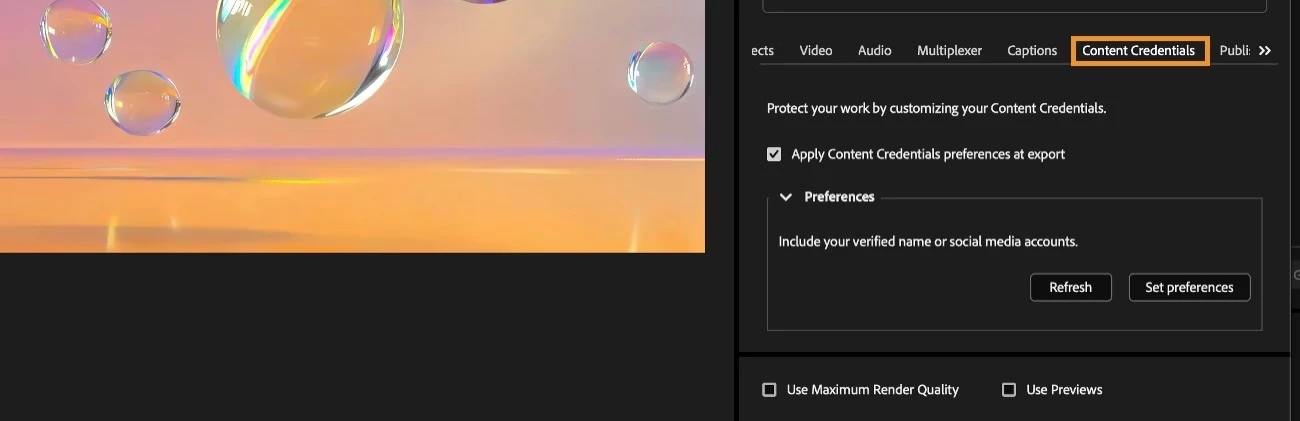
 

Adobe Media Encoder showing the Content Credentials tab with options to apply preferences at export.

Adobe Media Encoder now lets you customize and apply Content Credentials during export, directly from the Export Settings panel.

In the Content Credentials section, you can:

  • Open the preferences webpage using Set preferences
  • Choose what information is included in your exported video
  • Optionally link identity details such as social media accounts

Once configured, you can use the Content Credentials tab to:

  • Apply your saved preferences at export
  • Ensure consistent attribution information across outputs
  • Streamline credential application without leaving Media Encoder

This update makes it easier to ensure your exported videos carry the right provenance and creator context—right at the moment of delivery.
 

📘 Learn more

To get started, see the official Adobe Help documentation on using Export Settings to apply Content Credentials preferences when exporting video.


    3 replies

    morphinapg
    Inspiring
    October 5, 2026

    I can’t seem to post a bug report. I just get a white screen when I try to do so, so I will post it here and hope someone sees it:

    Currently, I can not encode HDR in Media Encoder. If I export directly from premiere, it works perfectly, but if I try to export an HDR sequence in Media Encoder, Media Encoder will tonemap the sequence down to SDR, even though the output file is saved with HDR metadata. So the file will look like an HDR file, but the colors will be mapped completely wrong, causing massive oversaturated and overbright when viewed in HDR.

    Translate
    morphinapg
    Inspiring
    October 5, 2026

    this was solved by creating a new sequence. Perhaps my original sequence was corrupted somehow despite being correctly set for Direct PQ

    The sequence was a duplicate of an earlier sequence so perhaps the issue is related to that?

    Translate
    Amelia Jack
    Participating Frequently
    April 16, 2026

    This is a solid move by Adobe. Integrating Content Credentials right into the export panel finally makes digital attribution feel like a standard part of the workflow rather than a tedious extra step. With all the AI-generated content floating around now, being able to bake your "digital signature" and social handles directly into the metadata is going to be essential for proving ownership and keeping your work from getting lost in the shuffle. It’s basically a nutrition label for video that actually sticks.

    Translate