Participating Frequently
October 2, 2026
Open for Voting

Custom Aspect Ratio dialog opens unexpectedly when 16:9 preset is already selected
And while we’re at it, please also fix the crop tool.

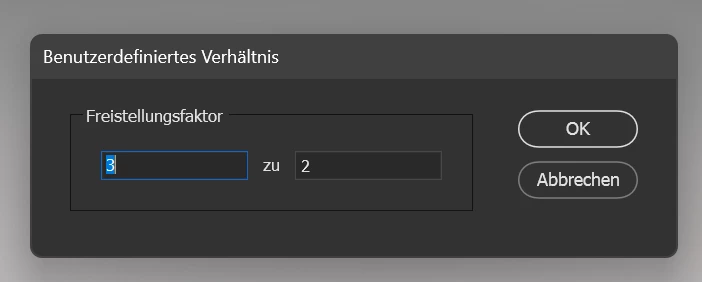
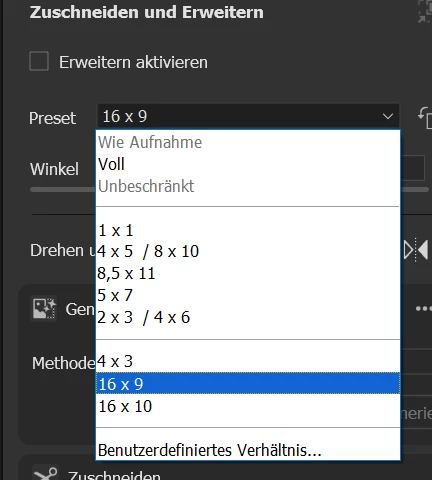
Even when 16:9 is already selected as the crop ratio, Camera Raw very often still opens the Custom Aspect Ratio dialog and asks me to enter the ratio manually again.

If 16:9 is selected, it should simply crop at 16:9. There is no reason to interrupt the workflow with another dialog asking for values that are already defined.

This is exactly the kind of basic workflow issue that should be fixed before adding even more AI features.

    2 replies

    Anshul_Saini
    Community Manager
    Community Manager
    October 16, 2026

    Hi ​@Frank32806397ntvm,

    Thanks for reporting this. The product team is tracking this issue.

    We have your screenshot showing 16:9 selected while the Custom Aspect Ratio dialog appears, but we’re still trying to determine the exact sequence that reliably triggers it.

    The next time it happens, could you let me know what you did immediately before the dialog appeared, for example, whether you selected 16:9 from the menu, entered Crop using a keyboard shortcut, switched images with 16:9 already active, or performed another action?

    If you can reproduce it consistently, a short screen recording showing the steps from entering Crop until the dialog appears would be especially helpful.

    The expected behavior is that the existing 16:9 preset remains active without opening the Custom Aspect Ratio dialog unless you explicitly request a custom ratio.

    Thanks again for helping us narrow this down.

    Best,
    Anshul Saini

    Translate
    Participating Frequently
    October 20, 2026

    Attached is a video showing the issue. I had to reduce the video quality to stay under the 50 MB upload limit.

    I’m using the Crop tool exactly as I always have. I open the aspect ratio menu and select 16:9, but instead of applying 16:9, Camera Raw opens the Custom Aspect Ratio dialog and shows 3:2.

    This happens very frequently — roughly 2 out of 3 times. The issue occurs directly when I select 16:9 from the menu and Camera Raw opens the custom ratio dialog instead of applying the selected preset.

    The attached video shows the behavior clearly.

    Translate