


P: Banding in previews
When I convert images to B&W, with some of the Adobe-supplied B&W profiles I see a lot of pixelated banding in the sky of standard previews (when in loupe view after pressing the 'E' key).
Rebuilding the preview doesn't help.
The only workaround is building a 1:1 preview, either by zooming in or by giving the command to build a 1:1 preview. I can then discard the 1:1 preview and still have a clean standard preview.
The preview quality level in the catalog settings is of no influence. My previews are set for 2880 pixels, which exactly matches my screen.
I'm using LR Classic 7.3.1 on a 2017 15" MacBook Pro (2.9 Ghz i7, 16GB RAM, Radeon Pro 560 w/4GB RAM) running MacOS 10.13.4 with both images and catalog on the local SSD.
Files are .RAFs from a Fuji X-T2. I'm seeing this with at least Adobe-supplied profiles BW 02 and BW 03.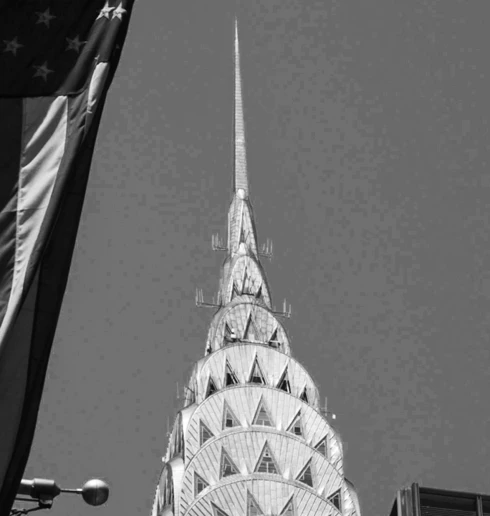
Screendump of portion of screen before building 1:1 preview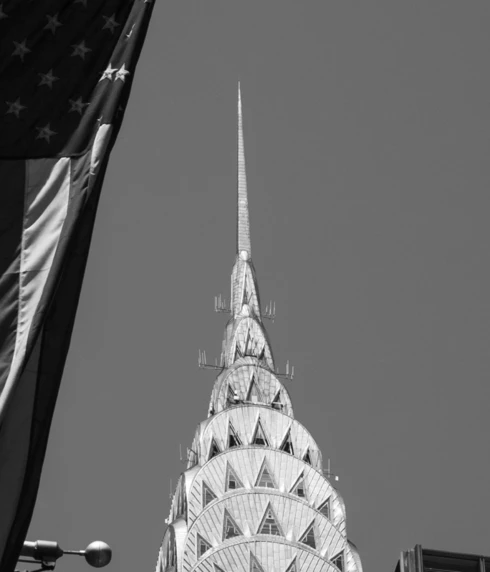
Roughly the same portion of the screen after building and discarding 1:1 previews.
Is this normal behavior, am I doing something wrong, or is this a bug?
 AdChoices