


Daisuke Yanagiya
Known Participant
June 18, 2020

P: Camera Raw/Lightroom Classic: X100V Camera Profile White Balance Shift

  • June 18, 2020
  • 14 replies
  • 663 views

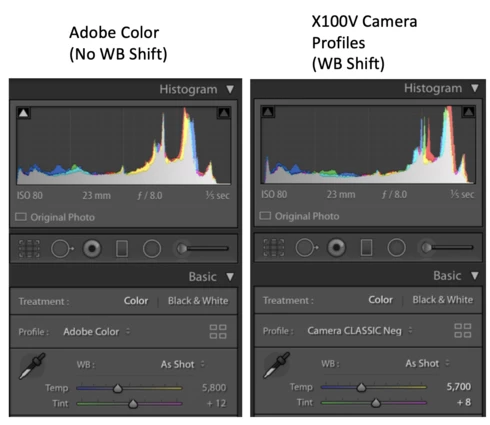
Strange behavior of camera profiles for X100V.
When applying camera profiles (like Camera Provia/Standard) to X100V RAW, white balance (temperature/tint) automatically shift.
This is specific behavior of X100V raw, the other Fujifilm Cameras don't reproduce this.
X-T3 and X-T30 use Camera Profiles v2, but X100V uses old original Camera Profiles v1.
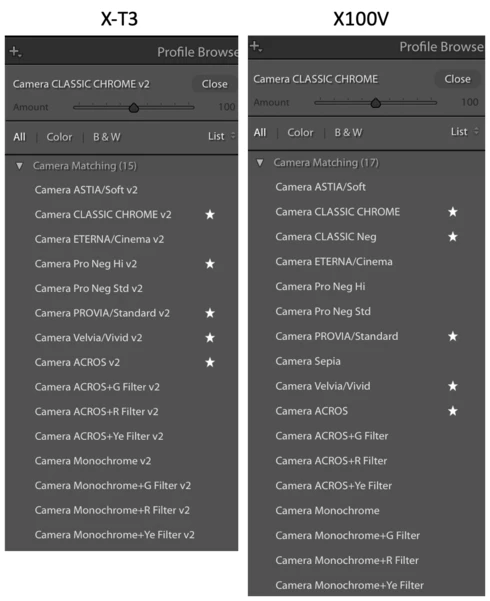

It's inconvenient when dealing with multiple X-Series cameras with common preset.

Camera: X100V
Macbook Pro 16
LrC 9.3

This topic has been closed for replies.

14 replies

Daisuke Yanagiya
Known Participant
June 19, 2020
Again, the other Fuji X-Trans 4 cameras don't behave like this. Every X-Trans 4 camera including X100V has exact same image sensor and exact same image processor. That's the reason we could have used same unified preset to edit multiple Fuji cameras.
Capture 1 can do it. Why LrC can't?

Actually,  there are/were lots of problems specifically in X100V raw, for example missing classic negative profile in the past, even now the default sharpness 40 is too softer than other sibling cameras.

Is there any logical reason LrC treat X100V RAW different from the other Fuji cameras?
TheDigitalDog
Inspiring
June 18, 2020
It's not WB per se, again the profile is agnostic but it could be the profile doesn't reflect the sensor like the one Adobe had. Anyway how about making your own CUSTOM profile for the illumination?
Author “Color Management for Photographers" & "Photoshop CC Color Management/pluralsight"
Daisuke Yanagiya
Known Participant
June 18, 2020
The other Fuji cameras don't have this unusual behavior. Only X100V has this issue. It's extremely inconvenient when usingpreset that includes film simulation camera profiles.
TheDigitalDog
Inspiring
June 18, 2020
AFAIK, this isn't anything new in terms of differing REPORTED CCT values from differing profiles. The profiles are WB agnostic; you are expected to set that if desired but, the values themselves that are shown are calculated from the original EXIF based on the profile(s). 
Author “Color Management for Photographers" & "Photoshop CC Color Management/pluralsight"